Your shopping cart is empty!
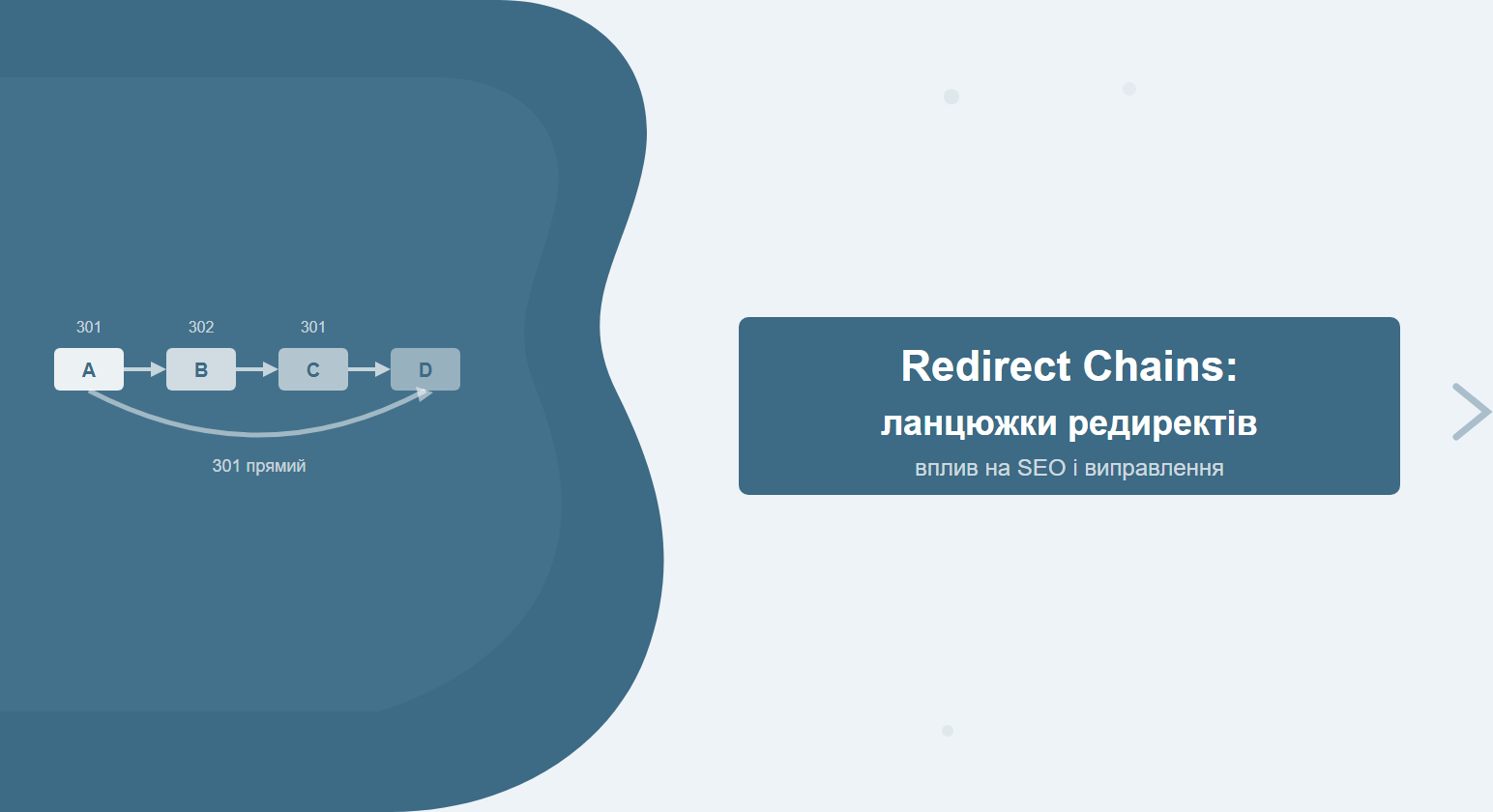
A redirect chain is what happens when a browser or crawler, instead of landing directly on the target page, has to bounce through two, three, or even five intermediate stops: URL A → B → C → D. Every extra hop costs time and bleeds PageRank. The problem is more common than most site owners realise — it quietly appears after redesigns, domain migrations, or a poorly planned HTTPS switch, slowly draining the link equity pages worked hard to earn.
Contents
- What is a redirect chain
- Redirect types and their SEO impact
- Why redirect chains hurt SEO
- How to find redirect chains
- How to fix redirect chains
- Chains after migration and redesign
- Monitoring and prevention
- Frequently asked questions
What is a redirect chain
A redirect chain is a sequence of automatic redirects in which the browser or search crawler receives not the destination page but an intermediate URL that redirects again. Instead of the direct route A → D, the system traverses A → B → C → D.
A well-configured redirect looks like this: request to the page — 301 response with the new address — browser loads the target resource. One hop. But when a server accumulates layers of redirect rules from multiple redesigns or infrastructure changes without ever cleaning up the old ones, a chain forms — and every intermediate link adds friction for both users and Googlebot.
A classic real-world example: an e-commerce site moved from HTTP to HTTPS (first redirect), then reorganised its URL structure from /category/product to /product (second), and years earlier had set up a www to non-www redirect at launch (third). No one ever retired the old rules — so every request to an old URL now travels three hops instead of one.
Core principle: one redirect is normal. Two is acceptable when unavoidable. Three or more is a problem that needs fixing.
Redirect types and their SEO impact
Not all redirects are equal. Different HTTP status codes have very different effects on link equity transfer and crawling behaviour.
| Code | Name | Link equity transfer | Use case |
|---|---|---|---|
| 301 | Moved Permanently | ~95% (practical estimates) | Permanent URL changes |
| 302 | Found (Temporary) | Minimal or none | Temporary promotions, A/B tests |
| 307 | Temporary Redirect | Minimal or none | HTTP/1.1 equivalent of 302, preserves method |
| 308 | Permanent Redirect | Equivalent to 301 | HTTP/1.1 equivalent of 301, preserves method |
| Meta refresh | HTML tag | Weak, delayed | Outdated, not recommended |
| JS redirect | JavaScript | Practically none | Last resort — Googlebot may not execute it |
301 — the standard tool for permanent moves
A 301 Moved Permanently is the correct choice for any lasting URL change. Google officially confirms that 301 passes link equity to the destination. But even a 301 passing through a chain gradually dilutes that equity — every intermediate step absorbs a portion of the signal before it reaches the final page.
302 and 307 — temporary, but dangerous when misused
Temporary redirects do not tell Google that a URL has changed for good. If a page has been sending a 302 for a year, Googlebot continues indexing the original address rather than the destination. External links pointing to the old URL do not consolidate equity into the new page — they just keep landing on a temporary detour.
JavaScript redirects — the invisible problem
A redirect executed via JavaScript may not fire at all for Googlebot on the first pass. The crawler processes HTML, defers JavaScript execution to a later rendering queue — and by the time the script runs, Google has already recorded the pre-redirect URL as the canonical destination. The page gets indexed without the redirect being honoured.
Why redirect chains hurt SEO
Redirect chains cause damage across several dimensions simultaneously. Here is a detailed breakdown of each.
PageRank and link equity dilution
Every link in the chain is a point where a fraction of link equity leaks away. Older estimates from SEO researchers suggested roughly 15% lost per intermediate hop. Google's current algorithm is more nuanced, but the principle holds: the shorter the path from an external link to the final page, the more equity that page receives. A chain of A→B→C→D instead of a direct A→D can strip page D of a meaningful share of its hard-earned link capital.
Slower page loading
Each hop in a chain is a separate HTTP request, possibly a new DNS resolution (if the domain changes), a TCP handshake, and server response wait time. Even if each hop responds in 50–100 ms, a three-hop chain adds 150–300 ms of latency before the browser receives any useful content. For Core Web Vitals — where LCP is measured in milliseconds — this is significant, especially on slow connections.
Googlebot crawl limit
Google officially describes support for up to 10 redirects in a chain, but Google's own documentation recommends avoiding even three. In practice, SEO specialists have observed Googlebot stopping after 5 hops without indexing the final destination at all. When that happens, the last URL in the chain simply falls out of search results — not because of a crawl error, but because the bot never got there.
Mobile performance
Mobile connections have higher latency than wired ones. On LTE, each HTTP round trip can cost 60–120 ms; on 3G, even more. A three-redirect chain on mobile translates to an extra 180–360 ms before the first byte arrives. Since Google uses mobile-first indexing and factors in loading speed, redirect chains directly depress mobile rankings.
Crawl budget
For large sites — e-commerce stores with thousands of SKUs, news portals, large directories — crawl budget is a finite resource. Googlebot spends requests and time navigating each link in a redirect chain. Pages with long chains consume budget that could instead have been spent crawling new or high-priority URLs.
Practical rule: if your site has more than 500 pages, audit for redirect chains every quarter — especially after any technical change or redesign.
How to find redirect chains
There are several methods to detect redirect chains, ranging from manual spot-checks to full-site automated audits.
Screaming Frog SEO Spider
The most widely used tool for technical SEO audits. After crawling, go to the Response Codes → Redirection (3xx) tab, then filter by the Redirect Chain column — or use the dedicated Redirect Chains report under the Reports menu. Screaming Frog lists every intermediate URL and the total number of hops in each chain.
Ahrefs Site Audit
Under Site Audit → Issues, look for the "Redirect chain" issue type. Ahrefs automatically flags pages with more than one redirect and displays the full chain from origin to final destination. A particularly useful feature: you can sort issues by the number of external backlinks pointing at each chain's starting URL, making it easy to prioritise fixes by potential impact.
Google Search Console
GSC does not show redirect chains directly, but the Coverage → Excluded → Redirect Error section signals when Googlebot failed to follow a chain to completion. Also check the Page Indexing report for pages with "Crawled — currently not indexed" status — some of those may be a downstream consequence of chains that stopped Googlebot mid-route.
Manual curl check
For individual URLs, the fastest method is a terminal command:
curl -sIL -w "%{url_effective}\n" https://example.com/old-pageThe -L flag tells curl to follow all redirects; -I returns only headers. The output shows each intermediate response and the effective final URL. This is ideal for quick verification of specific pages without running a full audit.
Online redirect checkers
For one-off checks, free tools like httpstatus.io or redirect-checker.org work well. They visualise the full redirect chain with HTTP codes at each step. The limitation is that they only check individual URLs — they cannot replace a systematic crawl of the entire site.
How to fix redirect chains
Fixing a redirect chain comes down to one principle: replace the chain A→B→C→D with a direct redirect A→D. Intermediate URLs either get their own direct rules pointing straight to the final destination or are removed entirely.
Step 1. Map all existing redirects
Before making changes, collect every redirect rule in one place. On Apache that is the .htaccess file; on Nginx it is the server { } block in the site configuration; on cloud CDNs (Cloudflare, AWS CloudFront) it is the page rules or redirect settings in the dashboard. CMS platforms (WordPress, Magento, OpenCart) may store redirects in plugins or admin panels — check those as well.
Step 2. Identify the final URL for each chain
For every starting URL that triggers a chain, determine where the user actually ends up. That is your target "D". Confirm that this final URL:
- returns status 200 (not another redirect)
- is accessible and indexed by Google
- is the correct, canonical version of the content
Step 3. Replace the chain with a direct 301
Configure a direct rule so that any request to A (and to all intermediate B, C) is immediately sent to D. For Apache in .htaccess:
RedirectPermanent /old-page-a https://example.com/final-page-d
RedirectPermanent /intermediate-page-b https://example.com/final-page-d
RedirectPermanent /intermediate-page-c https://example.com/final-page-d
Step 4. Verify the result
After deploying the changes, check each starting URL using curl or an online redirect checker. The expected result: one 301 hop directly to the final page — no intermediate stops.
Important: after fixing, re-run Screaming Frog or an Ahrefs Site Audit scan in 2–3 days to confirm no new chains have appeared elsewhere on the site as an unintended side effect.
Step 5. Update internal links
Server-side redirect fixes are only half the job. If internal links on the site still point to A or B rather than the final D, Googlebot will still travel at least one unnecessary hop on every crawl. Bulk-updating internal links to point directly to the final URL — via database search-and-replace or CMS tooling — eliminates this residual inefficiency entirely.
Chains after migration and redesign
The most common root cause of redirect chains is technical change without a review of existing redirect rules. Here are the typical scenarios.
HTTPS migration
When a site moves from HTTP to HTTPS, the correct setup is:
http://example.com/page→ 301 →https://example.com/page
But if a www-to-non-www redirect was already in place and sits first in the .htaccess file, a chain forms:
http://www.example.com/page→http://example.com/page→https://example.com/page
The fix: merge both rules into a single rule that catches any combination of HTTP + www and sends it directly to HTTPS + non-www in one step.
URL structure change
Redesigns commonly involve URL pattern changes: /blog/2023/title becomes /blog/title. If redirects from an even older URL structure already existed, the chain gains another link. Before rolling out a new structure, review all existing redirect rules and build a complete map of old → new before writing any new rules.
Domain migration
Moving to a new domain is the highest-risk scenario. If the old domain already has chains baked in, those chains migrate along with the redirect rules. The recommended approach: run a full audit and fix all existing redirect chains on the old domain first — then configure the cross-domain redirects to the new site.
| Scenario | Typical hop count | Risk level |
|---|---|---|
| HTTP → HTTPS (clean setup) | 1 | Low |
| HTTP + www → HTTPS non-www (without consolidation) | 2 | Medium |
| Old domain → new domain + URL structure change | 3–4 | High |
| Multiple redesigns without rule cleanup | 4–6+ | Critical |
Monitoring and prevention
Fixing redirect chains once is not enough. New chains emerge after every URL structure update, every new redirect added, and every server configuration change. Systematic monitoring prevents the problem from silently rebuilding itself.
Regular technical audits
Sites with active content updates or frequent technical changes should schedule a technical SEO audit every quarter. Stable sites can run audits every six months. Redirect chain checks should be a standard item on every audit checklist.
Automated monitoring in Ahrefs or Screaming Frog
Ahrefs Site Audit supports scheduled automatic crawls. Configure a weekly or monthly audit with notifications for new redirect chain issues — this lets you catch problems before they affect rankings rather than after.
Pre-deployment checklist
Any technical update involving URLs or redirect rules should go through a checklist before it goes live:
- Export all existing redirect rules into a single reference document
- Check whether any new rules create chains when combined with existing ones
- Test the changes in a staging environment before deploying to production
- After deployment, spot-check key URLs with curl to confirm single-hop behaviour
In our experience, the highest concentration of redirect chains appears on category pages of e-commerce sites after seasonal URL restructuring. A single template change often triggers dozens of chains simultaneously — which is why pre-deployment testing matters so much.
If you need help identifying and fixing redirect chains as part of a full SEO site audit or ongoing SEO promotion, the SEO-Factory team runs technical crawls and delivers actionable fix recommendations. Audits cover canonical tag issues, Core Web Vitals, and redirect problems as a unified technical review.
Frequently asked questions
How many redirects in a chain is the critical threshold?
Two redirects (A→B→C) already constitute a chain. Three or more is a problem that should be fixed as a priority. Google technically supports up to 10 hops, but after 5 the risk of Googlebot stopping before reaching the final destination grows significantly.
Does PageRank get lost at every 301 redirect?
Yes, partially. Google does not publish exact figures, but practical observations suggest approximately 10–15% equity loss per intermediate hop. A direct 301 to the final destination passes the maximum amount of link equity.
Should I use 302 or 301 for a temporary A/B test?
Use 302 for A/B tests and temporary promotions. Google will retain the original URL in its index and will not consolidate link equity into the temporary page. Once a redirect becomes permanent, switch it to 301.
Do redirect chains affect small sites too?
Yes, though crawl budget concerns are less acute for small sites. PageRank dilution and loading delays apply regardless of site size — and on competitive niches, even small equity losses can affect rankings.
How do I check a redirect chain without specialised tools?
The fastest method is curl -sIL URL in the terminal — it shows every intermediate response and the effective final URL. In a browser, open DevTools (F12), go to the Network tab, filter by Doc type, and inspect the chain of requests that fired before the page loaded.
Suspect redirect chains on your site?
SEO-Factory detects chains using Screaming Frog and Ahrefs, fixes redirects, and verifies that link equity is flowing correctly to the right pages.