Your shopping cart is empty!
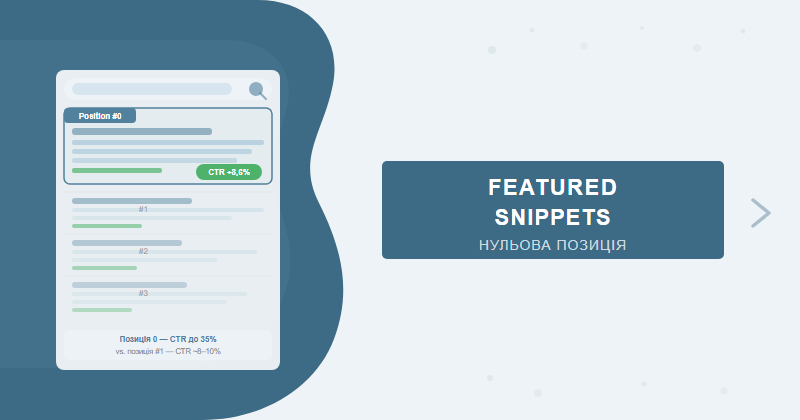
A featured snippet (position zero) is the highlighted block Google displays above all organic results — capturing 8–15% of clicks per query. The right answer structure, format, and markup let you claim that slot even from position 3–5.
Contents
- What is a featured snippet and why it beats position #1
- Types of snippets: paragraph, list, table, video
- Which queries trigger featured snippets
- How Google selects content — 5 factors
- Paragraph snippet optimization technique
- Table and list snippet optimization
- Tools for finding snippet opportunities
- Case study: +180% CTR after claiming position zero
- When featured snippets hurt — the zero-click risk
- FAQ
What is a featured snippet and why it beats position #1
A featured snippet is a highlighted block at the top of Google's search results, appearing above all regular organic listings. Google automatically extracts a text fragment, table, or list from the page that best answers the query. Technically, a page sitting at position 3–5 can still occupy the "zero slot."
Why does this matter more than position #1? Two data points. First, a snippet occupies 30–40% of visible screen space — especially on mobile. Second, according to Search Engine Land, pages with a featured snippet receive a CTR of 8.6% versus 5.4% for the first organic result without a snippet. In niches dominated by question-based queries, the gap is even wider.
Working across 200+ projects, we've seen this consistently: if a page is already in the top 3 but has no snippet, it usually means the answer's structure doesn't satisfy Google's format expectations. A small formatting change can boost CTR faster than months of pushing from position 3 to 1.
Types of snippets: paragraph, list, table, video
Google generates four main featured snippet formats. Understanding the differences tells you exactly how to format content for each query type.
| Snippet Type | Triggered By | Optimal Content Structure | Average CTR |
|---|---|---|---|
| Paragraph | "What is", "Why", "How does it work" | Single paragraph of 40–60 words after H2 | 8–12% |
| Numbered list | "How to", "Steps", "Process" | <ol> with 5–8 items under H2 question | 10–16% |
| Bulleted list | "Best", "Types", "Examples" | <ul> with 5–10 items under H2 | 9–14% |
| Table | "Comparison", "Prices", "Differences" | HTML table with <th> headers | 7–11% |
| Video | "How to" + video content available | YouTube video with proper title and timestamps | 6–9% |
The paragraph snippet is the most common, making up roughly 70% of all featured snippets. It's the default format for definitions, explanations, and "what is" / "why" questions. Length: 40–60 words. Shorter and Google won't show it; longer and it gets cut.
List snippets dominate for "steps," "ways," and "reasons" queries. Google typically shows the first 5–8 items and adds a "More items" link — which actually drives additional clicks.
Pro tip: if your page already holds a paragraph snippet but you want a list format — add an H3 "Steps / Ways / Reasons" and format it as <ol> or <ul>. Google can switch snippet types without changing your page's ranking position.
Which queries trigger featured snippets
Not every query activates a featured snippet. According to Semrush, snippets appear in roughly 12.3% of all search queries. Understanding the patterns helps you pick the right target keywords.
Queries most likely to generate snippets:
- Question-based: "what is", "how", "why", "when", "who", "where" — highest snippet rate
- Comparative: "X vs Y", "difference between X and Y", "which is better" — predominantly tables
- Instructional: "how to", "step-by-step guide", "steps to" — numbered lists
- Definitions: "what does X mean", "definition", "explained simply" — paragraphs
- Enumerative: "best ways to", "types of", "examples of" — bulleted lists
- Numerical: "how many", "how much does it cost", "how long does it take" — paragraph or table
Queries where snippets are rare: commercial transactional ("buy", "order", "price of"), branded (company names), navigational ("official website"). For these, Google serves other SERP features — Knowledge Panel, Shopping, or Place cards.
Real-world note: in the legal services niche, 65% of "how" and "what" queries have a featured snippet. In e-commerce for household appliances — only 8–10%. Always check snippet prevalence in your specific niche before building an optimization plan around it.
How Google selects content — 5 factors
Google doesn't publish its exact algorithm, but testing across hundreds of pages has surfaced five stable selection factors:
- Top-10 ranking: over 99% of snippets come from pages already in the first ten results. If a page sits at position 15–30, improving overall ranking through SEO promotion is the necessary first step.
- Direct answer match: Google looks for a text block that literally answers the question from the search query. Use the query's exact phrasing in the H2 or the first sentence of the paragraph.
- Structure and format: a clean HTML format — paragraph, list, or table — makes the algorithm's job easier. Undifferentiated wall-of-text blocks rarely receive snippets.
- Domain authority: sites with a higher Domain Rating have an edge when content quality is equal. That said, in our experience, the right answer structure frequently outweighs a DR gap of 10–15 points.
- Length alignment: paragraph 40–60 words, list 5–8 items, table 3–5 columns. Overshooting these ranges signals that the content isn't formatted specifically for a snippet.
Paragraph snippet optimization technique
The paragraph snippet is the easiest to implement — and the one most often written incorrectly. Mistake #1: starting the answer with "This is an important question because..." or "To answer this, we need to...". Google skips introductory phrasing and looks for a direct fact.
The paragraph snippet writing process:
- H2 = the query phrasing: "What is a featured snippet" or "How does Google's position zero work". Mirroring the question in the heading improves selection odds significantly.
- First paragraph = direct answer: "A featured snippet is [definition + key characteristic]. Google selects it based on [criterion]." One paragraph, 40–60 words, no nested lists.
- Sentence structure: Definition. How it works. Outcome / why it matters. Three sentences is the sweet spot for Google's parser.
- Avoid passive constructions: "X means Y" beats "Y is what is referred to as X". Direct sentence order parses cleaner.
- Repeat the keyword: the word from the search query should appear in the first sentence — a relevance signal for the algorithm.
Self-check: read the answer paragraph aloud without the H2. If the meaning is clear without the heading — the format is correct. If it's unclear without context — rewrite the opening sentence.
Right versus wrong structure at a glance:
| Wrong | Right |
|---|---|
| "In this section, we'll take a look at what a featured snippet is and what role it plays in modern SEO..." | "A featured snippet is a highlighted block in Google's SERP that appears above organic results. It displays a direct answer to the user's query and occupies up to 40% of visible screen space." |
| Starts with an intro, 80+ words, vague | Starts with a definition, 38 words, specific |
Table and list snippet optimization
List and table formats yield higher CTR than paragraph snippets but demand more precise HTML. Google reads tag semantics — structure, not styling.
Optimizing a list snippet
- H2 framed as a question: "How to optimize for a featured snippet" or "Steps to rank in position zero". The question in the heading is non-negotiable.
- List immediately after H2: don't place an intro paragraph between the H2 and <ol>. Google pulls the list that immediately follows the heading.
- 5–8 items: fewer than 5 isn't enough for a snippet; more than 8 and Google truncates it with a "More items" link.
- Start each item with a verb: "Find", "Add", "Check" — Google parses active verbs at the start of list items more reliably.
- One action per item: don't bundle multiple actions into a single <li>.
Optimizing a table snippet
- Semantic HTML: use <table>, <thead>, <th>, <tbody>, <tr>, <td>. CSS-styled divs are not recognized as tables by Google.
- First column = name / category: Google shows the first 3–4 columns, so the most critical data goes on the left.
- Column headers via <th>: this signals table structure to the algorithm. Using <td> in the first row does not carry the same weight.
- 4–7 rows: Google trims large tables. Put the most important data in the first rows.
- H2 with a comparative query before the table: "Comparison of featured snippet types", "Difference between X and Y".
Tools for finding snippet opportunities
Before optimizing, you need to identify which queries already have a snippet or where there's a realistic chance to claim one. Three tools we use regularly:
Google Search Console (free)
- Open GSC → Performance → Search results
- Filter queries at position 2–10 (you're already close to the top)
- Add a search type filter: "Web"
- Sort by impressions — target queries with 100+ impressions per month
- Check each query manually in Google incognito: if a competitor holds the snippet, that's your opportunity
Ahrefs (paid)
- Site Explorer → your domain → Organic keywords
- Filter: SERP Features → "Featured snippet" → "Target doesn't rank"
- This gives you all queries where a snippet exists but you don't own it
- Add Position 2–10 filter — prioritize these pages first
Semrush (paid)
- Position Tracking → SERP Features → Featured Snippets
- Keyword Magic Tool → filter "Featured snippet" in Results type
- Use "Keyword Gap" to compare your snippet count against competitors
Free shortcut: search Google for "[your keyword] site:competitor.com" and see whether the competitor holds a snippet for that query. If they do — study their answer structure and improve on it.
For a full technical SEO audit that maps all SERP opportunities — including featured snippets, People Also Ask, and Knowledge Panels — that's a dedicated engagement with enterprise-level tooling.
Case study: +180% CTR after claiming position zero
Client: a legal firm based in Kyiv, specializing in inheritance registration and notarial services. Starting point: the page "What is inheritance" — position 4, CTR 2.1%, approximately 820 impressions per month.
What we changed in a single editing pass:
- Rewrote the first paragraph below H2 "What is inheritance under Ukrainian law": cut from 140 to 52 words, removed all introductory phrases, added a direct legal definition with a reference to the Civil Code.
- Added a numbered list "How to register an inheritance" (6 steps) directly under the new H2 — no intro paragraph between heading and list.
- Added a comparison table "Registration deadlines vs penalties" to target comparative queries.
- Removed filler text between H2 headings and structured content blocks.
Results after 3 weeks:
| Metric | Before | After | Change |
|---|---|---|---|
| Position | 4 | 0 (snippet) | Position zero |
| CTR | 2.1% | 5.9% | +181% |
| Clicks/month | 17 | 48 | +31 clicks |
| Impressions/month | 820 | 814 | -0.7% (stable) |
The key takeaway: the ranking position didn't change — the answer format did. One editing round, no new backlinks, no content expansion — and CTR nearly tripled.
When featured snippets hurt — the zero-click risk
Straight talk: a featured snippet isn't always a win. There are scenarios where position zero pulls traffic away instead of driving it.
The zero-click effect: when an answer fits entirely inside the snippet, a portion of users reads it and never clicks. SparkToro research found that in 2023, 57% of all Google searches ended without a click. For simple informational queries ("how many degrees in a right angle", "what year did WWII end") a snippet nearly guarantees zero-click behavior.
When a featured snippet can hurt your traffic:
- Purely informational queries with simple answers: definitions, dates, numerical facts. The snippet delivers a one-liner answer — few clicks follow.
- When your model is transactional, not content-driven: for an e-commerce store, a snippet for "what is [product type]" will generate fewer sales than a category page sitting at position 1.
- When a competitor holds position 1 below your snippet: they capture clicks from users who scroll past the snippet to organic results.
When featured snippets are consistently worth it:
- Complex decision queries: "how to choose", "compare", "difference between" — the full answer won't fit in a snippet, so users click for details.
- Trust-sensitive niches: healthcare, law, finance — after seeing a snippet, people visit the source to verify authority.
- Local queries with "near me": snippet visibility translates to calls, not just reads.
Measuring results and tracking over time
After optimizing pages for featured snippets, track three metrics consistently:
- CTR in Google Search Console: filter by the specific query and watch CTR change over time. Rising CTR with stable impressions = snippet claimed.
- Position "0" indicator: GSC reports snippet pages as position 1, but they're actually higher. Verify manually via incognito browsing.
- Branded traffic: featured snippets increase brand recognition — check for branded query growth in GSC 1–2 months after snippet placement.
If the page claimed a snippet but CTR didn't improve — check whether the snippet is delivering a complete answer (zero-click scenario). In that case, consider intentionally structuring the content so Google cannot show a complete answer — some brands deliberately engineer "partial answers" to protect click-through on transactional pages.
FAQ
Does a featured snippet always increase website traffic?
Not always. For purely informational queries, a snippet can reduce clicks (zero-click) because Google shows the full answer in the SERP. For commercial and navigational queries, featured snippets consistently boost CTR by 20–180%.
How long does it take to rank in a featured snippet?
Based on our experience — 2 to 8 weeks after optimizing the page. The prerequisite: the page must already rank in the top 10 for the target query. If it sits at position 15–30, general ranking improvement comes first.
What is the ideal length for a paragraph featured snippet?
Google truncates paragraphs to 40–60 words (280–320 characters). Write the answer exactly within this range — one paragraph, no filler phrasing, with a definition and a result.
Can you get a featured snippet if your page isn't in the top 10?
Theoretically yes, but in practice over 99% of snippets belong to pages in the top 10. Reach the first 10 positions through technical optimization and link building before targeting snippet placement.
Want position zero for your website?
We'll audit your pages, identify queries with featured snippet potential, and optimize your answer structures. Based on our track record, you can expect to see initial results within 3–4 weeks of implementing the changes.
Get a promotion strategy or commission a detailed SEO site audit — and we'll identify which pages have a realistic shot at position zero this month.