Your shopping cart is empty!
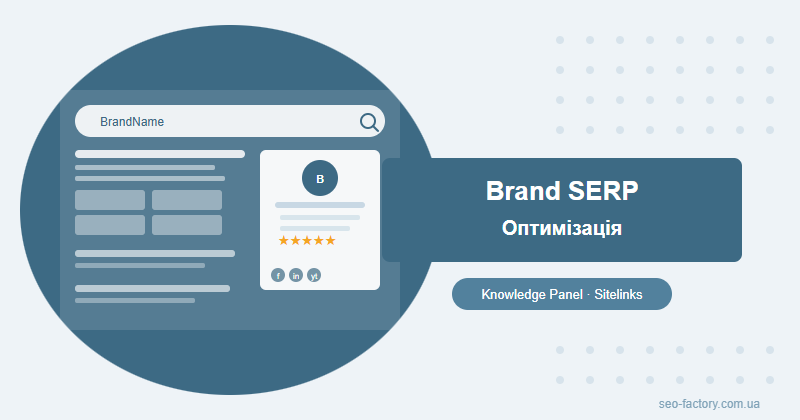
Your Brand SERP is what Google shows when someone searches your company name — and it shapes first impressions before they even reach your website. Optimising it builds trust, protects your reputation and keeps branded traffic firmly in your hands.
Contents
- What is a Brand SERP and why it matters
- Knowledge Panel: how to get one and what drives it
- Sitelinks in branded search results
- Reviews and star ratings in your Brand SERP
- Wikipedia and Wikidata for SEO
- Social profiles in the SERP
- Monitoring your branded search results
- Frequently asked questions
What is a Brand SERP and why it matters
Search Google for any established brand and you get something very different from a standard results page. There's a Knowledge Panel on the right, an expanded snippet with sitelinks at the top, star ratings, social profile links — sometimes a news carousel and a People Also Ask block. That complete picture is the Brand SERP.
Google assembles it automatically by drawing on dozens of signals: your website, Google Business Profile, Wikidata, social platforms, review sites and media coverage. You cannot dictate the output, but you absolutely can shape the inputs — and that shapes what prospects see when they investigate you.
Your Brand SERP is the Google page you didn't design but every new prospect reads. Ignoring it is the digital equivalent of leaving your shop front unmarked.
Why Brand SERP optimisation deserves a dedicated effort:
- First impressions happen here: BrightLocal data shows 81% of consumers check a company on Google before a first purchase. The Brand SERP is the page they land on.
- Competitor ad risk: if your Brand SERP is sparse, a competitor can bid on your brand name and appear above your organic result.
- Trust signals at a glance: a Knowledge Panel with a logo, 4.5-star rating and verified social links signals legitimacy far more powerfully than a plain blue link.
- Reputation defence: a controlled Brand SERP pushes negative third-party content off page one before it causes damage.
A pattern we see often: a business runs a paid campaign, awareness spikes, and people search the brand name — only to find a Knowledge Panel-free result with a 3.1-star GBP rating and no social presence. That disconnect erodes conversion significantly. Brand SERP work should ideally run in parallel with any awareness activity, not after it.
Brand SERP elements: the full map
| Element | Data source | Level of control |
|---|---|---|
| Knowledge Panel | Wikidata, GBP, Schema.org | Moderate |
| Sitelinks | Site structure and authority | Indirect |
| Star ratings | Google Business Profile | High |
| Social profiles | Verified social accounts | High |
| News / media mentions | PR coverage | Low |
Knowledge Panel: how to get one and what drives it
The Knowledge Panel is the information card that appears to the right of search results on desktop, or above them on mobile. It displays your logo, a short description, contact details and links to social profiles. Google only generates it when it has enough confidence that your organisation is real, distinct and sufficiently documented.
The four strongest signals
1. Google Business Profile
A fully completed GBP is the fastest route to a Knowledge Panel for most businesses. Treat every field as mandatory: legal name, category, address or "online business" designation, phone, website, opening hours, description, and at least 5–10 photos including a clear logo. A thin or incomplete profile sends a weak signal.
Logo consistency matters: the image in GBP, the logo URL in Schema.org Organization markup and any Wikidata reference should all point to the same file or be visually identical. Mismatches confuse the Knowledge Graph.
2. Schema.org Organization markup
Adding @type: Organization JSON-LD to your homepage gives Google a structured briefing on who you are. The minimum viable set of properties:
- name — your official brand name
- url — homepage URL
- logo — direct URL to your logo (at least 112×112 px)
- contactPoint — phone and/or email
- sameAs — array of all your verified profile URLs, including Wikidata
3. Wikidata as the Knowledge Graph backbone
Google's Knowledge Graph is built substantially on Wikidata. A Wikidata entry for your company is not reserved for household names — any organisation with a public footprint can create one. You need a handful of independent source references attached to each claim (news articles, industry directories, press releases work well).
4. NAP consistency across the web
NAP — Name, Address, Phone — must be identical everywhere: your website, GBP, social profiles and every business directory where you're listed. Even minor formatting differences introduce conflicting signals. Google resolves conflicts by hedging, which often means delaying or not showing the Knowledge Panel.
Verifying your Knowledge Panel
Once a Knowledge Panel appears, you can claim it via Google Search Console. Verification lets you suggest edits: update your description, swap the logo, add or correct social links. Google makes the final call, but verified suggestions are processed considerably faster than anonymous feedback.
Sitelinks in branded search results
Sitelinks are the block of 4–8 sub-page links that appear beneath your main result for a branded query. Google generates sitelinks automatically, drawing on site structure, internal linking patterns and user behaviour data. There is no manual selection — but you can engineer conditions that produce accurate, useful sitelinks.
What shapes sitelinks quality
- Navigation clarity: a well-labelled top-level menu with logical sections is the foundation Google starts from.
- Internal linking: pages that receive more internal links tend to appear in sitelinks more reliably. See our guide on internal linking and site architecture for the full framework.
- Anchor text quality: descriptive, non-generic anchor texts help Google understand what each page is actually about.
- Page authority: sections with organic traffic and external backlinks carry more weight in the sitelink algorithm.
- Robots.txt and noindex: technical and duplicate pages that shouldn't appear as sitelinks must be excluded from indexing.
Simplicity over complexity: a bloated navigation with 20+ top-level items produces cluttered, low-quality sitelinks. Google picks what it thinks matters most — so a focused, well-signalled structure beats an exhaustive one.
Removing unwanted sitelinks
Occasionally the wrong pages surface in sitelinks — old campaign landing pages, technical routes, or outdated blog categories. There's no direct removal tool, but these approaches consistently work:
- Apply
noindexto pages you want excluded. - Remove or reduce internal links pointing to those pages.
- For already-indexed pages, use a canonical tag pointing to the preferred URL, or redirect.
Reviews and star ratings in your Brand SERP
Star ratings are one of the most attention-grabbing elements in any Brand SERP. The visual cue works even before someone reads a single word. According to ReviewTrackers, businesses rated 4.0–4.5 stars attract 28% more clicks than equivalent listings without ratings. Managing reviews is not just a reputation task — it's a measurable traffic lever.
Google Business Profile: the primary channel
GBP reviews are Google's own data and feed most directly into the branded search experience. A systematic approach to collecting them matters:
- Send clients a direct GBP review link immediately after project completion or delivery.
- Embed a review request in your post-sale email sequence.
- Never incentivise reviews with discounts or gifts — this violates Google's policies and risks profile suspension.
- Respond to every review, positive and negative, within 24–48 hours. Silence on a negative review reads as confirmation.
Third-party review platforms
Google sometimes surfaces third-party ratings in branded results. Which platforms it draws from depends on the industry: Clutch and G2 for B2B software, Trustpilot for e-commerce, industry-specific directories for professional services. To become eligible:
- A verified profile with at least 10–15 reviews.
- A sustained rating of 3.5 stars or above.
- Steady, ongoing review activity — not a one-time burst followed by months of silence.
Handling negative reviews strategically
- Respond publicly, calmly and specifically. Acknowledge the issue without being defensive.
- Offer a private resolution path. Provide a direct contact and invite the person to reach out.
- Do not try to have legitimate reviews removed through platform manipulation — it typically backfires and can result in your account being flagged.
- Statistical dilution: generating 10 genuine positive reviews changes aggregate perception far more efficiently than fighting one negative one.
Note on Schema.org AggregateRating: this markup shows stars on individual product and service pages — it does not control the star rating in your Knowledge Panel. Google sources that independently from GBP and third-party platforms.
Wikipedia and Wikidata for SEO
Wikipedia and Wikidata are not just reference resources — they are two of Google's most trusted inputs for the Knowledge Graph. Getting your organisation represented there accurately is one of the highest-leverage Brand SERP actions available, and it's frequently overlooked by businesses that assume it's only for large corporations.
Wikidata: a practical walkthrough
- Register an account at wikidata.org.
- Search for existing entries — duplicates are common and should be merged rather than replaced.
- Create a new item with
instance of: business enterprise(Q4830453). - Add statements: official website, country, official name, industry.
- Attach a source reference to each statement — a news URL, directory listing or press release validates the claim.
The
official website property is non-negotiable. It is the primary mechanism Google uses to link a Wikidata entry to a specific domain. Without it, even a well-structured Wikidata entry is unlikely to trigger a Knowledge Panel.
The sameAs property: connecting your presence
In Schema.org Organization markup, sameAs is an array of URLs that tells Google: all of these profiles describe the same entity. Include:
- Your Wikidata entity URL (
https://www.wikidata.org/entity/Q...) - Facebook company page
- LinkedIn company page
- YouTube channel
- Wikipedia article URL (if one exists)
The more cross-references Google can verify, the stronger the entity signal — and the faster a Knowledge Panel tends to materialise. In our experience working with mid-market B2B clients, a correctly structured Wikidata entry combined with a complete Schema.org Organisation block typically produces a Knowledge Panel within 4–8 weeks.
Wikipedia: an honest assessment
Wikipedia's notability criteria are strict. For a business, this means several independent media publications that mention the company without the company having initiated or funded the coverage. PR-wire releases do not count. If that threshold hasn't been reached, attempting to create a Wikipedia article is likely to result in deletion and can leave a visible trace of the failed attempt.
For most businesses, Wikidata alone delivers the same Knowledge Panel effect as Wikipedia, with far fewer hurdles. Focus there first.
Social profiles in the SERP
Social networks serve two functions in a Brand SERP. First, they appear as icon links within the Knowledge Panel. Second, major brand profiles — particularly LinkedIn and Facebook — often rank as standalone organic results for branded queries, occupying positions that would otherwise be available to third-party or negative content.
Which profiles Google features most reliably
- LinkedIn — consistently surfaces for companies with a complete company page and regular posting activity.
- Facebook — verified pages with active content tend to rank on page one for most brand queries.
- YouTube — channels with at least some published content and a subscriber base.
- Instagram — particularly effective for consumer brands in fashion, food and lifestyle.
- Twitter/X — strong for tech companies, media outlets and public figures.
Maximising your social footprint in SERP
- Verify profiles where available — official verification badges signal legitimacy to both users and Google.
- Add your website URL to every profile — the reciprocal link creates a two-way entity signal.
- List all profiles in
sameAswithin your Schema.org Organization markup. - Post consistently: inactive profiles are deprioritised by Google in SERP construction.
- Keep name and logo identical across all platforms — consistency reinforces the entity signal across the Knowledge Graph.
Social profiles as a displacement strategy
When your own site (with sitelinks), LinkedIn, Facebook, YouTube and a couple of quality media mentions occupy the first 8–10 results for your brand query, there is simply no space left for negative third-party content to surface on page one. This is a displacement strategy — and it is more durable than attempting to have specific pages removed.
Every active, well-maintained social profile is a position in your Brand SERP that you hold before anyone else can claim it.
Monitoring your branded search results
Brand SERP is a living thing. Google tests new formats, competitors launch ad campaigns targeting your brand name, review scores shift, media coverage comes and goes. Without a monitoring routine, you find out about problems after they've already done damage.
What to track and how
| Signal | Tool | Frequency |
|---|---|---|
| Knowledge Panel appearance and content | Manual check / Semrush | Monthly |
| GBP rating and new reviews | GBP Dashboard | Weekly |
| Branded search traffic and CTR | Google Search Console | Weekly |
| Competitor ads on brand queries | Semrush Brand Monitoring | Monthly |
| Brand mentions in media | Google Alerts, Mention | Real-time |
| Sitelinks composition | Manual check (incognito) | Quarterly |
Reading branded data in Google Search Console
Filter your GSC performance data by queries containing your brand name. Three metrics to watch closely:
- CTR: a drop in CTR while impressions hold steady typically means a competitor ad or negative content has appeared above your result.
- Impressions: rising impressions reflect growing brand awareness; a sustained fall warrants investigation.
- Average position: your domain must rank first for your own brand name without exception. Anything else is a technical SEO emergency. Our complete GSC guide covers how to diagnose ranking issues systematically.
Response priorities when something changes
- Unanswered negative review — respond within 24 hours, publicly and constructively.
- Competitor or aggregator ranking above you for your brand — audit technical SEO, check for canonical errors and manual actions in GSC.
- Knowledge Panel disappears — check Wikidata entry, GBP status and NAP consistency across all platforms.
- Sitelinks vanish — often signals a major structural change to the site or an accidental mass deindex.
If you'd like a structured Brand SERP audit and a clear action plan, SEO-Factory offers professional SEO promotion services tailored to each business's competitive landscape.
Frequently asked questions
What is a Brand SERP and why does it matter?
A Brand SERP is the Google results page that appears when someone searches your company name. It typically includes a Knowledge Panel, sitelinks, star ratings, social profiles and news snippets. Optimising it builds credibility, reduces the risk of competitors stealing branded traffic and helps protect your reputation online.
How do you get a Knowledge Panel on Google?
A Knowledge Panel appears when Google has enough structured data to confidently identify your organisation. Key steps: complete your Google Business Profile, create a Wikidata entry with your official website linked, add Schema.org Organization markup with sameAs references, ensure NAP consistency across all platforms, and verify ownership through Google Search Console.
Can you control which sitelinks appear in branded search?
Not directly — Google generates sitelinks automatically. However, you can influence them by maintaining a clear site structure and navigation, using descriptive anchor texts, building internal link equity to key sections, and using noindex to exclude pages you do not want featured.
Is it worth creating a Wikidata entry for a small brand?
Yes. Wikidata is one of Google's primary sources for Knowledge Graph data. You can create an entry for any brand that has at least a few independent public references (news mentions, directories, official website). It's free and noticeably increases the likelihood of a Knowledge Panel appearing.
Want to take control of your Brand SERP?
SEO-Factory audits branded search results and builds a concrete optimisation plan covering Knowledge Panel, sitelinks and online reputation management.
Get SEO promotion