Your shopping cart is empty!
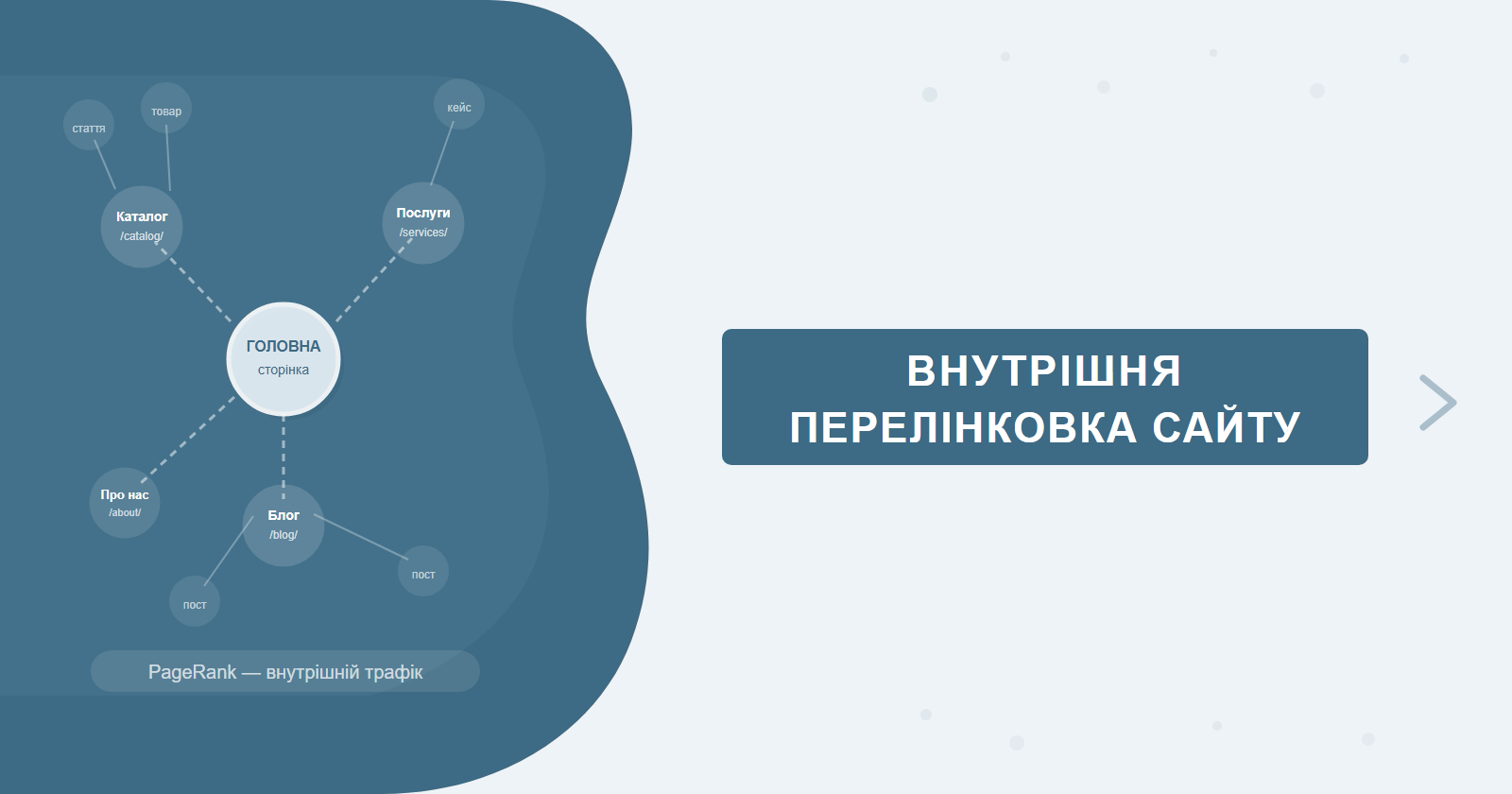
Internal linking is one of the few SEO tools where getting it right delivers a double benefit: it improves PageRank distribution across pages and increases user engagement simultaneously. Yet most sites treat it as an afterthought — links get placed wherever there's space in the text, rather than according to architectural logic. This guide covers the systematic approach from audit to automation.
Internal linking is a core component of a comprehensive SEO promotion strategy. For Google's official guidance on how internal links affect indexing, see developers.google.com.
Contents
Why Internal Linking Matters for SEO
Googlebot crawls a site by following links. A page with no incoming internal links — an "orphan" — may never get indexed at all, or get re-crawled far less frequently. But that's just the surface level.
Internally, links distribute PageRank (link equity) within a site. Pages that receive more internal links from authoritative sections accumulate more equity and tend to rank higher. This lets you deliberately boost priority commercial or landing pages without additional external links.
Beyond rankings, internal linking serves two more purposes:
- Crawl budget — a well-structured link architecture directs the crawler toward important pages and doesn't waste crawl budget on utility URLs.
- User engagement metrics — relevant in-text links keep users on the site longer, reduce bounce rate, and increase pages-per-session.
Types of Internal Links and Their Role
Not all internal links carry the same weight or serve the same purpose. Understanding which types exist on your site is the starting point for any linking audit.
The key takeaway: footer and navigation links appear on every page, so Google dilutes their weight considerably. A single editorial link in the middle of a relevant paragraph is far more valuable, even if it's the only such link on the entire site.
Site Architecture and PageRank Flow
Link equity flows downward from the homepage. The homepage typically receives the most external links and is the entry point for most crawlers. The job of internal linking is to channel this equity efficiently toward priority pages.
A practical rule: every blog article should include 1–3 links to relevant service or landing pages. This isn't promotional noise — it's logical architecture where informational content reinforces commercial pages.
Anchor Text Strategy
Anchor text gives Google a signal about the topic of the destination page. For internal links, using keyword-rich anchors is significantly less risky than for external links — Google expects internal anchors to be descriptive and contextually relevant. You have full control, and you should use it intentionally.
Anchor types and their distribution
| Anchor type | Example | When to use | Share |
|---|---|---|---|
| Exact match | "SEO website promotion" | Primary landing pages | 20–30% |
| Partial match | "ranking in Google", "SEO audit" | Most in-text links | 40–50% |
| Branded | "SEO-Factory", "the SEO-Factory team" | Links to homepage or contact | 10–15% |
| Naked URL | "seo-factory.com.ua/website-promotion/" | Rarely, in technical contexts | 5–10% |
| Generic | "here", "learn more", "see also" | Only when nothing better fits | up to 10% |
Over-optimisation risks and natural distribution
While internal links are less risky from a penalty perspective than external ones, repeating the same exact-match anchor across 15 articles creates an unnatural pattern Google can flag. The right approach is variation — same destination, different anchor formulations depending on the source article's context.
Natural anchor distribution isn't a mathematical formula — it's common sense. If you're writing about "improving Google rankings" and linking to a service page, "ranking improvement" is a natural anchor. Inserting "SEO website promotion" into an article about PPC is a stretch — and Google increasingly reads context, not just keywords.
Anchor formulas by site type
Blog / media sites: prioritise informational anchors tied to the article's topic. Commercial links weave naturally into context: "find out the service cost", "request an audit", "see case studies".
E-commerce: category and product name anchors — predominantly category names ("Nike running shoes", "laptops for work"), sometimes with modifiers. Avoid purely transactional anchors ("buy", "order") as the sole anchor pattern — monotonous signal for Google.
Services / B2B: mix exact match and partial match, prioritise specifics ("technical SEO audit", "internal link audit", "page speed optimisation"). Avoid vague anchors like "our services".
Tip: don't use the same anchor text twice on one page for the same URL. A duplicated anchor is a manipulation signal. Vary the phrasing even for the same destination.
Silo Structure and Hub Pages
What is a content silo
A content silo is a way of organising pages into thematic clusters, where all pages within a cluster are interlinked but aren't cross-linked with other clusters. The goal: give Google a clear signal of topical depth in each niche.
A silo has two levels:
- Hub page — the "gravitational centre" of the cluster. The most comprehensive, authoritative page on the topic. It links to all spoke pages and receives links from them. Example for an SEO agency: "Comprehensive SEO Promotion" — a hub covering all aspects of the service.
- Spoke pages — deeper, narrowly focused materials. Technical SEO audit, page speed, URL structure, mobile optimisation — each is a spoke page linking back to the hub and potentially to adjacent spoke pages.
Example structure for an SEO agency
| Level | Page | Type | Links to |
|---|---|---|---|
| Hub | /website-promotion/ — Comprehensive SEO | Hub | All spoke pages |
| Spoke | /tech-seo-audit/ — Technical Audit | Spoke | Hub + adjacent spokes |
| Spoke | /site-speed/ — Page Speed | Spoke | Hub + /tech-seo-audit/ |
| Spoke | /core-web-vitals/ — Core Web Vitals | Spoke | Hub + /site-speed/ |
| Blog | Article "LCP, INP, CLS" | Support | /core-web-vitals/ + Hub |
The most common silo mistake is keyword cannibalisation. If the hub and spoke pages target identical keywords, they compete with each other. The hub should answer "what is X" or "comprehensive X", while spokes answer "how to do a specific aspect of X".
Finding and Fixing Problems
Orphan pages: pages with no incoming links
Orphan pages are the most critical internal linking problem. A page that no other site page links to may get indexed via sitemap.xml, but gets re-crawled infrequently and receives zero internal link equity.
How to find them: Screaming Frog SEO Spider → after crawl → "Inlinks" tab → sort by incoming link count → URLs with 0 or 1 incoming link are candidates for fixing. In GSC: Links → Internal links → compare against your full URL list.
Pages with too many outbound links (diluted PageRank)
A page linking to 200+ internal URLs (e.g., a footer with all services and all blog articles) passes negligible equity to each destination. Recommended maximum: 100 links per page. If navigation and content combined exceed this, consider restructuring the menu or reducing "related articles" blocks.
Broken internal links and redirect chains
Links to deleted or renamed pages (404s) are a loss of link equity and worsen crawling efficiency. Redirect chains (A → B → C → D) also dissipate equity. Screaming Frog finds both in a single crawl. Fix: update links to point directly to the final URL wherever possible.
Tip: after any redesign or site migration — always audit internal links. This is the most common cause of unexpected traffic drops after a relaunch. Screaming Frog will surface all broken links and redirect chains in about 20 minutes.
Breadcrumbs
The SEO value of breadcrumbs
Breadcrumbs are the navigation trail at the top of a page: Home → Category → Subcategory → Article. From an SEO perspective they serve two purposes simultaneously.
First, breadcrumbs are internal links with descriptive anchors, passing equity upward from pages to their parent categories. Every blog article via its breadcrumb links back to the category — which receives a consistent signal from every article published under it.
Second, breadcrumbs with Schema.org BreadcrumbList markup display in SERP results instead of the raw URL:
<script type="application/ld+json">
{
  "@context": "https://schema.org",
  "@type": "BreadcrumbList",
  "itemListElement": [
    {
      "@type": "ListItem",
      "position": 1,
      "name": "Home",
      "item": "https://seo-factory.com.ua/en/"
    },
    {
      "@type": "ListItem",
      "position": 2,
      "name": "SEO Promotion",
      "item": "https://seo-factory.com.ua/en/website-promotion/"
    },
    {
      "@type": "ListItem",
      "position": 3,
      "name": "Technical Audit",
      "item": "https://seo-factory.com.ua/en/website-promotion/tech-audit/"
    }
  ]
}
</script>
In SERP, instead of the raw URL users see: "Home > SEO Promotion > Technical Audit". Cleaner, more scannable — which means better CTR. This is well-supported by A/B test data across dozens of industries.
Automating Internal Linking
WordPress plugins
Link Whisper — the most popular plugin for automatic internal link suggestions. When editing an article, it analyses the text and suggests relevant internal links with specific anchor text. One-click insertion. Price: ~$77/year. Downside: occasionally suggests irrelevant links — manual review is needed.
Internal Link Juicer — automatically inserts links into existing content based on configured keywords. You can set a maximum link count per page and exclude specific URLs. Price: free tier available, Pro from €59/year.
Manual link map in Google Sheets
For smaller sites (under 200 pages), a manual Google Sheets map is often more effective:
| Source URL | Destination URL | Anchor text | Status |
|---|---|---|---|
| /blog/core-web-vitals/ | /en/website-promotion/ | SEO website promotion | Done |
| /blog/internal-linking/ | /en/website-promotion/ | site promotion services | In progress |
| /blog/site-speed/ | /en/website-promotion/ | technical optimisation | Planned |
Algorithm for new articles
- Identify 1–2 commercial pages the new article can naturally link to
- Find 2–3 older blog articles on adjacent topics — add links to the new article from them (speeds up indexation)
- Check for keyword cannibalisation — if the new article targets the same keywords as an existing one, consider merging or clearly differentiating the topics
- Log the links in your Google Sheets map
Analysing Links with Tools
Screaming Frog SEO Spider
The best tool for a complete site crawl. After scanning it shows: incoming internal link count per URL, orphan pages (0 incoming links), redirect chains and broken links. Free version covers up to 500 URLs; larger sites need the paid licence (£199/year).
Google Search Console → Internal Links
The "Links" → "Internal links" report shows the top pages by internal link count. If a commercial page ranks below utility pages in this list — that's a clear signal to rework the architecture.
Ahrefs Site Audit / Semrush Site Audit
Paid tools provide a full internal link graph, site structure visualiser, and automated alerts for orphan pages, single-link pages, and excessive depth (4+ clicks from homepage).
Tip: start with GSC — free and shows real Google data. Run Screaming Frog for detailed investigation of specific problems. Ahrefs/Semrush are worth it when you need automated reporting at scale.
Click Depth and Crawl Budget
Why click depth matters
Click depth — the number of clicks it takes to reach a page from the homepage — is one of the key factors affecting how often Googlebot crawls a page. Google's own guidelines recommend that all important pages be reachable within 3 clicks from the homepage. Pages buried 5+ clicks deep may go months between crawls.
This is particularly relevant for large e-commerce sites: a structure of "Home → Category → Subcategory → Filter → Product" automatically places many product pages at click depth 4–5. The fix: flatten the hierarchy or add direct links from the homepage or top-level categories to priority subcategories.
| Click depth | Crawl frequency | Recommendation |
|---|---|---|
| 1–2 clicks | Crawled frequently | Place your priority commercial pages here |
| 3 clicks | Crawled regularly | Acceptable for all important pages |
| 4 clicks | Crawled less often | Only acceptable for secondary pages |
| 5+ clicks | Risk of under-indexation | Shorten the path or add direct links |
How to check click depth
Screaming Frog SEO Spider displays click depth for every URL in the "Crawl Depth" column after scanning. Ahrefs Site Audit shows this in Structure → Click Depth. If priority pages (service pages, key landing pages) are sitting at depth 4+, that's a direct signal that linking architecture needs work.
Tip: use GSC → Coverage → Indexed to monitor indexation. If the number of indexed pages significantly trails your actual page count, check click depth and orphan pages first — these are the two most common causes of under-indexation at scale.
A Practical Implementation Plan
If your site's internal linking has never been built systematically, here's where to start:
One practical habit: whenever you publish a new article, immediately find 2–3 older posts where the topic overlaps and add links to the new piece from them. This speeds up indexation and instantly integrates the new content into the site's link network.
Common Internal Linking Mistakes to Avoid
Beyond the technical issues (broken links, orphan pages), there are several architectural mistakes that are harder to spot but equally damaging.
Only linking from new articles. A common pattern: teams add internal links in every new article they publish, but old content from 2–3 years ago gets no updates. Yet those older articles often carry the most external backlinks and the highest domain authority on the site. Not using them as sources of internal link equity is a wasted opportunity.
Too many links from a single section. If one blog category sends 50 links to a service page with the same anchor text, the pattern looks manipulative rather than architectural. Spread links across different content sections with varied anchor formulations.
Links only flowing downward. Hub → spoke, homepage → category — yes, that's the primary flow. But spoke pages and blog articles should also link back up to the hub. Upward links from spoke pages reinforce the hub's authority and confirm its role as the cluster's centre of gravity.
Skipping breadcrumb schema markup. Breadcrumbs without Schema.org BreadcrumbList are a missed opportunity for enhanced SERP snippets. Implementing the markup takes a developer 30–60 minutes, and the impact appears in search results as soon as the page is re-crawled.
Quick check: search "site:yourdomain.com" in Google and review the first 20–30 results. If utility pages (tag archives, pagination, login) dominate the listings over commercial pages, that's a sign of poor link equity distribution and a flag for an immediate internal linking audit.
PageRank Sculpting and Link Equity Distribution
What PageRank sculpting means in practice
PageRank sculpting is the deliberate management of where and how much link equity flows within your site. The underlying logic: if a page has 10 outbound links, the equity it passes is split 10 ways. If it has 3 links, each receives roughly three times as much. This means the number of links on a page directly determines how much equity each destination actually receives.
In practice: placing 50 links in your footer pointing to every service page simultaneously means each receives a negligible fraction of that equity. A better approach is 5–7 strategic footer links to your highest-priority pages, while the bulk of link equity flows through editorial in-text links within articles.
The right vs. wrong internal link: a concrete HTML example
Here's what the difference looks like at the code level:
<!-- BAD: generic anchor — gives Google no topic signal -->
<p>To learn more about SEO, <a href="/en/website-promotion/">click here</a>.</p>

<!-- GOOD: descriptive anchor — directly signals the destination page's topic -->
<p>For strategy details and pricing, see our
<a href="/en/website-promotion/">SEO website promotion</a> service page.</p>
The code difference is trivial. The SEO difference is significant: "click here" tells Google nothing about the destination page, while "SEO website promotion" reinforces the page's topical relevance every time it receives that anchor from a new source page.
Tool-specific workflows: Screaming Frog, Ahrefs, Netpeak Spider
Screaming Frog SEO Spider — run a full crawl, then go to Reports → Crawl Overview for a high-level summary. For link-specific data: Bulk Export → All Inlinks gives you every internal link on the site with source URL, destination, anchor text and link type. Filter the Inlinks tab by count = 0 to isolate orphan pages instantly.
Ahrefs Site Audit — the Link Opportunities report is uniquely useful: it automatically surfaces pages that contextually should link to a target URL but currently don't. For large content sites (500+ articles), this replaces hours of manual cross-referencing. The Internal Link Graph visualiser shows link equity flow across the site structure as an interactive diagram.
Netpeak Spider — a cost-effective alternative to Screaming Frog, particularly popular in Eastern European markets. Produces pre-built report templates for orphan pages, click depth distribution, and redirect chain identification. Export to Excel is clean and audit-ready without additional formatting.
Monitoring Internal Linking Effectiveness
What to track and where
Changes to internal linking structure take 4–8 weeks to show up in rankings — Google needs to re-crawl and re-process the updated equity signals. Here's a monitoring framework:
| Metric | Where to check | What a change means |
|---|---|---|
| Rankings for priority pages | GSC → Performance → Pages | Increase = equity reaching the target page |
| Indexation coverage | GSC → Coverage → Indexed | Increase = crawl now reaching previously orphaned pages |
| Internal links per URL | GSC → Links → Internal links | Commercial pages should outrank utility pages in this list |
| Crawl stats | GSC → Settings → Crawl stats | Crawl increase after changes = architecture is working |
| Click Depth distribution | Screaming Frog → Crawl Depth | Reduction in 4+ depth pages = better bot accessibility |
How to read the Internal Links report in GSC
Open GSC → Links → Internal links and review the top 20 pages by incoming link count. If that list is dominated by utility pages — tag archives, paginated pages, login pages — rather than commercial pages, the diagnosis is clear: link equity is flowing to the wrong places. Screenshot the current state, make your changes, and re-check the same report 6–8 weeks later. Service pages and key landing pages should appear at the top of that list.
Tip: take a screenshot of the Internal Links report in GSC before you start. Two months later, you'll have a clear before/after comparison showing how priority pages moved up the list. This is the simplest way to demonstrate the impact of a linking project to a client or stakeholder.
Frequently Asked Questions
How many internal links should a page have?
There's no strict limit — Google's old guideline was under 100 links per page. In practice, quality matters more than quantity: links should be relevant and contextually natural. For commercial pages, 3–10 well-anchored internal links are typically sufficient.
How do internal links affect rankings?
Internal links pass PageRank between pages and help Google understand site hierarchy and topical structure. Pages with more internal links get crawled more frequently and indexed faster. Good internal linking can improve rankings for inner pages without external backlinks.
What should anchor text look like?
Anchor text should be descriptive and contain the target keyword or a close synonym. Avoid generic anchors like "click here" or "read more" — they carry no SEO signal. Diversify anchors: exact match + LSI variations + branded + URL.
Does reciprocal linking (A→B and B→A) hurt SEO?
Reciprocal linking doesn't hurt if it's natural and contextually justified. Problems arise with mass cross-linking between dozens of pages, which looks manipulative. One or two reciprocal links between topically related pages is completely normal.
Need an internal linking audit?
We'll analyse your site's link architecture: find orphan pages, over-deep pages, and the best leverage points for strengthening commercial URLs. Deliverable: a ready-to-use link map and recommendations for your developer or content editor.