Your shopping cart is empty!
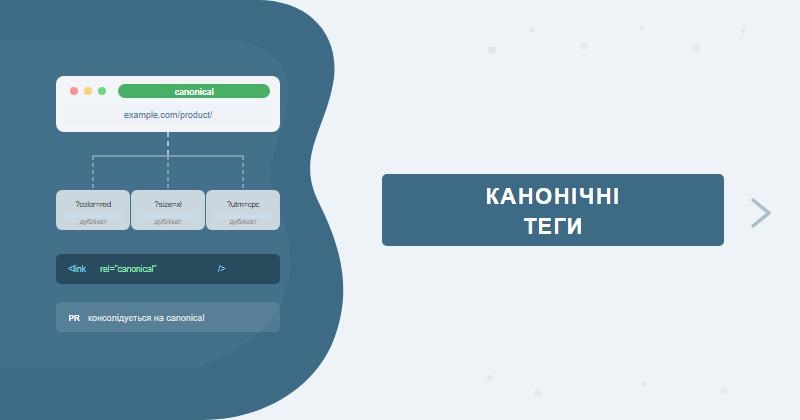
The rel=canonical tag tells Google which URL is the authoritative version when duplicate or near-duplicate pages exist. Without it, duplicates drain crawl budget and split link equity. Here's how it works, when Google ignores it, and what mistakes to avoid.
Table of Contents
- What canonical tags do and why they matter
- Case study: e-commerce site with 40% duplicate URLs from filters
- When Google overrides your canonical tag
- Self-referencing canonicals — why every page needs one
- Canonical tags and pagination
- Cross-domain canonical
- Canonical vs noindex vs 301: comparison table
- Common canonical implementation mistakes
- Tools for auditing canonical tags
- FAQ
What canonical tags do and why they matter
The rel="canonical" HTML attribute launched in 2009 as a joint initiative by Google, Bing, and Yahoo. It lives in the <head> section of your page:
<link rel="canonical" href="https://example.com/product/blue-sneakers/" />
The problem it solves is content duplication. The same content can become accessible under multiple URLs because of:
- filter and sort parameters (/catalog?color=blue&size=42)
- session identifiers (/page?sessionid=12345)
- UTM tracking parameters (/blog/post?utm_source=newsletter)
- WWW vs non-WWW (www.site.com vs site.com)
- HTTP vs HTTPS variants
- trailing slash (/page/ vs /page)
Each URL variant is a potential duplicate. Google burns crawl budget visiting them, and link equity gets split across copies instead of accumulating on one page. The canonical tag says: "These URLs are all versions of the same page — count this one."
According to Google's official documentation on canonicalization, using canonical tags is the recommended way to handle duplicate and near-duplicate content at scale.
Case study: e-commerce site with 40% duplicate URLs from filters
One of the clearest examples from our practice involved a fashion e-commerce store with 8,000+ SKUs. The client came to us frustrated: organic traffic had grown just 4% over twelve months while competitors in the same niche were up 25–40%.
What the audit found
A Screaming Frog crawl revealed 12,400 indexed URLs against a real page count of ~7,300 unique pages. The gap — 5,100 duplicates — came entirely from catalog filter parameters: color, size, material, price range, sort order. The CMS generated a unique URL for every filter combination. No canonical tags existed anywhere on the site.
- 40% of indexed URLs were filter-parameter duplicates
- Crawl budget: Googlebot was crawling ~1,800 pages per day, with ~720 of those being duplicates
- New products took 3–5 weeks to get indexed instead of 2–4 days
- PageRank for category pages was spread thin across duplicates — average ranking position for category keywords was 18–24
What we did
- URL parameter audit in GSC (Search Console → Legacy tools → URL Parameters) to identify which parameters change content vs which do not.
- Canonical tags on all filtered URLs → pointing to the clean category URL without parameters.
- Self-canonicals added to every clean category and product URL.
- GSC URL Parameters configured — marked filter parameters as "doesn't change content".
- Re-crawl requests submitted via GSC for 200 priority URLs.
Results after 10 weeks
| Metric | Before | After | Change |
|---|---|---|---|
| Indexed URLs | 12,400 | 7,650 | -38% |
| Average position (category keywords) | 18–24 | 9–13 | +10 positions |
| Organic traffic | baseline | +67% | +67% |
| New product indexing speed | 3–5 weeks | 2–4 days | 8x faster |
| Organic CTR (categories) | 2.1% | 3.8% | +81% |
No new links built. No content changes. Just canonical tags — and organic traffic grew 67% in 2.5 months. We cover how to find and fix issues like this in our SEO audit service.
When Google overrides your canonical tag
Canonical is a hint, not a directive. Google explicitly states this in its documentation and will choose a different canonical URL when it detects contradictions. Here are the situations we encounter most frequently in our technical audits:
- Canonical points to a noindex page — conflicting signals; Google ignores the canonical
- Redirect chain between duplicate and canonical — if there's a 301 or 302 in the middle, Google may select the intermediate URL
- Significant content difference — if the duplicate and canonical differ by more than 30–40% in text, Google may treat them as separate pages
- Canonical targets a 404 or 5xx page — the canonical destination is unreachable
- HTTP Link header conflicts with HTML tag — server sends one canonical via the Link header, HTML contains another
- Malformed relative URL — a relative path that resolves incorrectly due to base tag issues
Quick check: In GSC Coverage → Excluded → look for "Alternate page with proper canonical tag". If your important pages appear there, the canonical is working. If those URLs show up under "Indexed" instead — Google chose a different canonical or ignored your tag entirely.
Self-referencing canonicals — why every page needs one
A self-referencing canonical means the page /product/sneakers/ has a canonical pointing to itself. It sounds redundant, but it's a meaningful defensive signal.
Why it matters:
- Protection from externally linked URL variants — if someone links to /page?ref=affiliate123, the self-canonical locks down the clean URL as authoritative
- HTTP/HTTPS protection — old inbound links pointing to the http:// version won't create unintended duplicates
- Explicit signal for Googlebot — the page is intentionally marked as its own canonical
- Prevents CMS-generated canonical loops — when a theme auto-generates canonicals, explicit self-canonicals prevent accidental misconfiguration
Our standard recommendation: self-canonicals on every indexable page, no exceptions. In WordPress this is handled automatically by Yoast SEO or Rank Math. In other CMS platforms — configure it in the head template.
Canonical tags and pagination
Pagination is one of the most mishandled areas for canonicals. The old rel="prev/next" approach was deprecated by Google in 2019. Here's what works today:
| Pagination type | Recommended approach | When to apply |
|---|---|---|
| /catalog/page/2, /3, /4... | Each page is self-canonical. Paginated pages have unique product listings. | When paginated pages receive traffic and backlinks |
| ?page=2 parameter | canonical ?page=2 → /catalog/ (page one) | Only if paginated pages have no unique content worth indexing |
| View-all page | Canonical all paginated pages → /catalog/all/ | When you have a single full-listing page you want to rank |
From our experience: Setting canonical on /page/2 → /page/1 is a bad pattern for e-commerce catalogs. Paginated pages contain unique products — this canonical tells Google to "see" only page one of your catalog. We've measured 20–35% organic traffic loss on deep catalog pages after this kind of misconfiguration.
Cross-domain canonical
Canonical tags can point to a different domain, not just other pages on the same site. Google has supported cross-domain canonical since 2012. Common use cases:
- Content syndication — your article republished on a partner site with canonical → your original
- Domain migration — temporary canonical from old domain to new domain during site moves
- Regional versions — if site.com and site.co.uk have identical content (though hreflang is preferable for language/region targeting)
- Legacy mobile subdomain — m.site.com → site.com (outdated practice, but still encountered)
Cross-domain canonical signals the source, but doesn't fully transfer PageRank the way a 301 redirect does. During domain migrations, canonical is a temporary 1–2 month measure. Replace it with proper 301 redirects once the migration is confirmed stable.
Canonical vs noindex vs 301: comparison table
Three tools, three different use cases. Mixing them up is one of the most common technical SEO mistakes we catch in audits.
| Criterion | rel=canonical | noindex | 301 redirect |
|---|---|---|---|
| What it does | Designates the "primary" URL version | Removes page from index | Physically redirects to another URL |
| Page accessible to users | Yes | Yes (not in search results) | No (automatic redirect) |
| PageRank transfer | Partial (~85–90%) | None | Full (100%) |
| Google crawls the duplicate | May still crawl (uses crawl budget) | Crawls but doesn't index | Follows redirect |
| Best for | URL parameters, UTM tags, filters, syndication | Technical pages (cart, profile), thin content | Permanent URL consolidation, site migrations |
| Risk | Can be overridden by Google | Accidentally removing important pages from index | Redirect chains reduce PageRank transfer |
Common canonical implementation mistakes
Based on technical audits of 200+ sites, here are the 7 mistakes we find most often:
-
http:// canonical on an https:// site
The CMS generates canonicals with http:// even though the site migrated to https years ago. Google sees a protocol mismatch between the actual URL and the canonical. -
Inconsistent trailing slash handling
/product/sneakers and /product/sneakers/ are technically different URLs. Pick one version and apply it consistently across all canonical tags sitewide. -
Category pages canonicalizing to the homepage
A common CMS template bug: pages without a custom title get canonical pointing to the homepage. Result: Google only "sees" the homepage. -
Multiple canonical tags in the head section
If two canonical tags appear in head, Google picks the first and ignores the rest. Usually caused by conflicting WordPress plugins. -
Paginated pages canonicalizing to page one
Hides products on deep catalog pages from indexing. -
Relative URL without a reliable base tag
<link rel="canonical" href="/product/sneakers/">— technically allowed but risky. If your base tag is misconfigured, it may resolve to an unintended URL. Always use absolute URLs.
Non-canonical URLs included in sitemap.xml
If a URL is in your sitemap, Google considers it "worthy of indexing". If that same URL is marked non-canonical through another page's canonical tag, you have a conflicting signal. Keep duplicates out of your sitemap.
Quick audit check: GSC → Coverage → Excluded → "Alternate page with proper canonical tag". A large list with important pages signals something is wrong with your canonical configuration.
Tools for auditing canonical tags
Manually checking canonical tags across thousands of pages is not feasible. Here's what we use in practice:
| Tool | What it shows | Cost |
|---|---|---|
| Google Search Console | Coverage → Excluded → "Alternate page with proper canonical tag" and "Duplicate without user-selected canonical" | Free |
| Screaming Frog SEO Spider | Canonicals tab: missing canonicals, cross-domain canonicals, canonical loops, noindex + canonical conflicts | Free up to 500 URLs, from $259/yr |
| Ahrefs Site Audit | Issues → "Pages with a canonical tag pointing to redirect", "Canonical chain", "Multiple canonical tags" | From $129/mo |
| Semrush Site Audit | Issues → Duplicate content, canonical issues — with explanation and fix recommendation | From $139/mo |
| GSC URL Inspection | Per-URL check: shows "User-declared canonical" vs "Google-selected canonical" — identifies mismatches | Free |
Our 4-step audit workflow:
- Screaming Frog → Export → Canonicals — pull all canonical tags into a spreadsheet
- GSC → Coverage → Excluded — review "alternate pages" and "duplicates" categories
- GSC → URL Inspection on flagged URLs — compare "user-declared canonical" vs "Google-selected canonical"
- Sitemap.xml audit — confirm no non-canonical URLs are included in the sitemap
If your site hasn't had a technical audit, canonical issues are almost certain to be present. We identify and fix them as part of our SEO site audit and SEO promotion service. The typical crawl budget saving after canonical cleanup is 25–45% of redundant URL crawls.
FAQ
Should I add a self-referencing canonical tag on every page?
Yes. A self-canonical (pointing to the page itself) is recommended on all canonical pages. It protects against PageRank dilution when third parties link to your page with UTM parameters or via the http:// version of your URL.
Why does Google ignore my canonical tag?
Google treats canonical as a hint, not a directive. The most common reasons for being overridden: the canonical target has a noindex tag, there is a redirect chain between the duplicate and the canonical URL, or the two pages differ significantly in content.
Canonical tag or 301 redirect — which is better?
For permanently merging two URLs, a 301 redirect is stronger — it passes 100% PageRank and removes the duplicate physically. A canonical keeps the duplicate accessible but passes PageRank only partially. Use canonical when both URLs must remain accessible.
How long does it take Google to process a canonical tag?
Typically 1–4 weeks for large sites, 3–7 days for smaller ones. You can speed up the process via Google Search Console → URL Inspection → Request Indexing on the canonical URL.
Duplicate content holding your rankings back?
Canonical tag audit, URL parameter analysis, and full duplicate content review are part of our technical SEO audit. If your site's organic growth has stalled despite content investment, technical duplicates are often the root cause.
Explore our SEO services or learn more about our site audit.