Your shopping cart is empty!
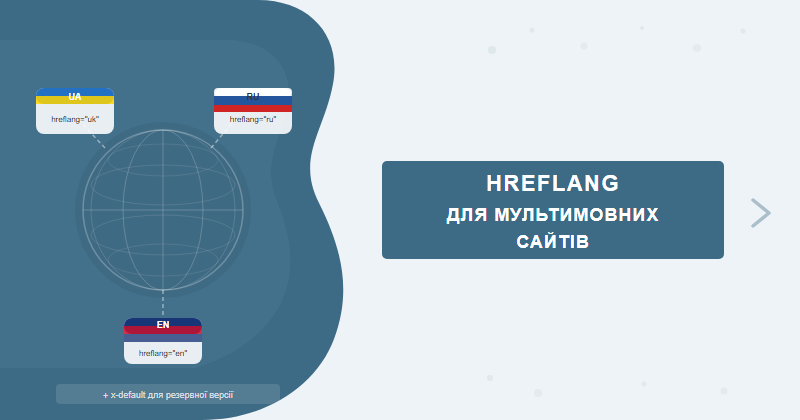
Hreflang is a link attribute that tells Google which language or regional version of a page is intended for a specific audience. Without it, a multilingual site gets traffic cannibalization between versions and the wrong pages appearing in search results.
Table of Contents
- What is hreflang and when do you actually need it
- Syntax: language vs language+region
- Three implementation methods: comparison
- Mandatory rules: return links and x-default
- Hreflang and canonical: how they interact
- Top 7 errors with code examples
- Diagnostics: Screaming Frog, GSC, hreflang Testing Tool
- Case study: multilingual site after fixing hreflang
- Frequently asked questions
What is hreflang and when do you actually need it
The hreflang attribute is an HTML directive for search engines (primarily Google and Yandex) that indicates the relationship between multiple versions of the same page that differ in language or region. Google does not "guess" the correct version on its own — without hreflang it chooses arbitrarily, and often gets it wrong.
Google introduced the attribute back in 2011, yet from our auditing experience in 2025–2026 the vast majority of multilingual sites still contain critical hreflang implementation errors. The consequences are predictable: wrong page version appearing in SERPs, cannibalization between language editions, and dropping CTR.
When hreflang is necessary:
- Multiple language versions of a site — for example, Ukrainian, Russian and English on separate URLs
- Same content, different regions — English for the US (
en-US) and UK (en-GB) with different prices or policies - Subdomains or subdirectories per language —
ua.site.comvssite.com/en/ - Duplicate content across language versions — when one version is partially translated and the rest is identical
When hreflang is NOT needed: if your site is monolingual and targets a single country, hreflang only adds complexity with no benefit.
Syntax: language vs language+region
The hreflang attribute value is formed according to ISO 639-1 (language) and ISO 3166-1 alpha-2 (region) standards. Knowing when to use language-only versus language+region codes is critical for correct operation.
Language only (no region)
Use this when the content is the same for all speakers of that language regardless of country:
<!-- One version for all Ukrainian-speaking users worldwide -->
<link rel="alternate" hreflang="uk" href="https://site.com/ua/">

<!-- One version for all Spanish speakers worldwide -->
<link rel="alternate" hreflang="es" href="https://site.com/es/">
Language + region (recommended for e-commerce)
Use when the content differs by country — prices, currency, shipping terms, legal text:
<!-- English for the United States -->
<link rel="alternate" hreflang="en-US" href="https://site.com/en-us/">

<!-- English for the United Kingdom -->
<link rel="alternate" hreflang="en-GB" href="https://site.com/en-gb/">

<!-- Spanish for Mexico -->
<link rel="alternate" hreflang="es-MX" href="https://site.com/es-mx/">

<!-- Spanish for Spain -->
<link rel="alternate" hreflang="es-ES" href="https://site.com/es-es/">
Practical tip: For most B2B and SaaS sites, language-only codes (
uk, ru, en) are sufficient. Regional targeting is only worthwhile when the content genuinely differs between countries.
| Code | What it means | When to use |
|---|---|---|
uk |
Ukrainian language (all regions) | Single Ukrainian-language version |
ru |
Russian language (all regions) | Single Russian-language version |
en |
English language (all regions) | Global English without regionalization |
en-US |
English for the United States | Separate pricing, conditions for US market |
en-GB |
English for United Kingdom | British spelling, GBP pricing |
x-default |
Default fallback version | For audiences without a matching language version |
Three implementation methods: comparison
Google supports three methods for implementing hreflang. The choice depends on site type, CMS, and server access. In our practice of setting up hreflang for multilingual sites, the most common mistake is mixing different methods on the same site — which causes conflicts and leads Googlebot to ignore the tags entirely.
| Method | Where it lives | Pros | Cons | Best for |
|---|---|---|---|---|
| HTML <head> | <head> section of each page | Easy to set up, supported by all CMS platforms | Bloats HTML size, hard to scale past 10,000 pages | Sites under 1,000 pages, WordPress, OpenCart |
| HTTP Header | Server HTTP response header | Only option for PDF and non-HTML files | Requires server access (Apache/Nginx), harder to debug | PDF catalogs, file-based resources |
| XML Sitemap | sitemap.xml file | Keeps HTML lean, easy to scale, convenient for large sites | Requires CMS/sitemap generator support, errors harder to catch | Large e-commerce, portals with 10,000+ pages |
Method 1: HTML <head>
The most common approach. Tags are added to the <head> section of every page:
<head>
  <!-- Ukrainian version -->
  <link rel="alternate" hreflang="uk" href="https://site.com/ua/page/">
  <!-- Russian version -->
  <link rel="alternate" hreflang="ru" href="https://site.com/ru/page/">
  <!-- English version -->
  <link rel="alternate" hreflang="en" href="https://site.com/en/page/">
  <!-- Default fallback -->
  <link rel="alternate" hreflang="x-default" href="https://site.com/page/">
</head>
Method 2: HTTP Header
Used for non-HTML resources. Nginx configuration example:
location /catalog.pdf {
  add_header Link '<https://site.com/ua/catalog.pdf>; rel="alternate"; hreflang="uk",
                   <https://site.com/en/catalog.pdf>; rel="alternate"; hreflang="en",
                   <https://site.com/catalog.pdf>; rel="alternate"; hreflang="x-default"';
}
Method 3: XML Sitemap
The optimal choice for large sites. sitemap.xml file structure:
<?xml version="1.0" encoding="UTF-8"?>
<urlset xmlns="http://www.sitemaps.org/schemas/sitemap/0.9"
        xmlns:xhtml="http://www.w3.org/1999/xhtml">
  <url>
    <loc>https://site.com/ua/page/</loc>
    <xhtml:link rel="alternate" hreflang="uk"
                href="https://site.com/ua/page/"/>
    <xhtml:link rel="alternate" hreflang="ru"
                href="https://site.com/ru/page/"/>
    <xhtml:link rel="alternate" hreflang="en"
                href="https://site.com/en/page/"/>
    <xhtml:link rel="alternate" hreflang="x-default"
                href="https://site.com/page/"/>
  </url>
  <url>
    <loc>https://site.com/en/page/</loc>
    <xhtml:link rel="alternate" hreflang="uk"
                href="https://site.com/ua/page/"/>
    <xhtml:link rel="alternate" hreflang="ru"
                href="https://site.com/ru/page/"/>
    <xhtml:link rel="alternate" hreflang="en"
                href="https://site.com/en/page/"/>
    <xhtml:link rel="alternate" hreflang="x-default"
                href="https://site.com/page/"/>
  </url>
</urlset>Mandatory rules: return links and x-default
Two rules that hreflang cannot work without, regardless of implementation method.
Rule 1: Bidirectional (return) links
Every language version must link to all other versions, including itself. If the Ukrainian page links to the English page, the English page must also link back to the Ukrainian page. A missing return link causes Google to discard the entire hreflang cluster.
<!-- Correct: EVERY page contains links to ALL versions -->

<!-- On the UA page (/ua/page/) -->
<link rel="alternate" hreflang="uk" href="https://site.com/ua/page/">  <!-- self-reference -->
<link rel="alternate" hreflang="ru" href="https://site.com/ru/page/">
<link rel="alternate" hreflang="en" href="https://site.com/en/page/">
<link rel="alternate" hreflang="x-default" href="https://site.com/page/">

<!-- On the EN page (/en/page/) - SAME set of tags! -->
<link rel="alternate" hreflang="uk" href="https://site.com/ua/page/">
<link rel="alternate" hreflang="ru" href="https://site.com/ru/page/">
<link rel="alternate" hreflang="en" href="https://site.com/en/page/">  <!-- self-reference -->
<link rel="alternate" hreflang="x-default" href="https://site.com/page/">
Rule 2: The x-default attribute
The x-default tag specifies the fallback page for users whose browser/region does not match any of your declared language versions. Typically this is the homepage or a language selection page:
<!-- x-default = language selection page or homepage (EN) -->
<link rel="alternate" hreflang="x-default" href="https://site.com/">
Note: x-default does not have to match one of the language versions. It can be a dedicated language-picker landing page —
site.com/choose-language/.
Hreflang and canonical: how they interact
Canonical and hreflang are two separate signals for Google, and they do not conflict when set up properly. Issues arise when developers confuse their functions.
Canonical tells Google: "This page is the primary version when duplicates exist." Hreflang says: "These pages are translations of the same content for different audiences."
The key rule: canonical must be self-referencing when a page is part of an hreflang group. Each language version has its canonical pointing to itself.
<!-- CORRECT: canonical points to the current (own) page -->
<!-- On UA page (site.com/ua/page/) -->
<link rel="canonical" href="https://site.com/ua/page/">
<link rel="alternate" hreflang="uk" href="https://site.com/ua/page/">
<link rel="alternate" hreflang="en" href="https://site.com/en/page/">

<!-- WRONG: canonical on one language version points to another language -->
<!-- On UA page (site.com/ua/page/) -->
<link rel="canonical" href="https://site.com/en/page/">  <!-- ERROR! -->
<link rel="alternate" hreflang="uk" href="https://site.com/ua/page/">
<link rel="alternate" hreflang="en" href="https://site.com/en/page/">
When the canonical on the UA page points to the EN version, Google treats the UA page as a duplicate and excludes it from the index — hreflang stops working for that page pair entirely.
Top 7 errors with code examples
Based on our auditing experience, 9 out of 10 multilingual sites have at least one of these errors. Many have several simultaneously:
Error 1: Missing return links
<!-- ERROR: Only the UA page links to EN, but EN does not link back to UA -->
<!-- UA page: -->
<link rel="alternate" hreflang="uk" href="https://site.com/ua/">
<link rel="alternate" hreflang="en" href="https://site.com/en/">

<!-- EN page: -->
<link rel="alternate" hreflang="en" href="https://site.com/en/">
<!-- Missing hreflang="uk" -- Google IGNORES the entire cluster! -->
Error 2: Wrong language code
<!-- ERROR: Non-existent or incorrect codes -->
<link rel="alternate" hreflang="ua" href="...">   <!-- Correct: "uk" -->
<link rel="alternate" hreflang="rus" href="...">  <!-- Correct: "ru" -->
<link rel="alternate" hreflang="eng" href="...">  <!-- Correct: "en" -->

<!-- CORRECT: -->
<link rel="alternate" hreflang="uk" href="...">
<link rel="alternate" hreflang="ru" href="...">
<link rel="alternate" hreflang="en" href="...">
Error 3: Linking to redirects or inaccessible URLs
<!-- ERROR: hreflang points to a URL with a 301 redirect -->
<link rel="alternate" hreflang="uk" href="https://site.com/ua/page">
<!-- If this URL redirects to site.com/ua/page/ (with trailing slash) -- Google ignores the tag -->

<!-- CORRECT: final URL without redirects -->
<link rel="alternate" hreflang="uk" href="https://site.com/ua/page/">
Error 4: Incomplete set of language versions
<!-- ERROR: 3 language versions exist, but hreflang declared for only 2 -->
<link rel="alternate" hreflang="uk" href="https://site.com/ua/page/">
<link rel="alternate" hreflang="en" href="https://site.com/en/page/">
<!-- Missing hreflang="ru" -- the Russian version won't receive proper traffic allocation -->
Error 5: Missing x-default
<!-- ERROR: No x-default tag -->
<link rel="alternate" hreflang="uk" href="https://site.com/ua/">
<link rel="alternate" hreflang="ru" href="https://site.com/ru/">
<link rel="alternate" hreflang="en" href="https://site.com/en/">
<!-- What will Google show a Japanese user? Result is unpredictable -->

<!-- CORRECT: -->
<link rel="alternate" hreflang="x-default" href="https://site.com/en/">
Error 6: Mixing implementation methods
<!-- ERROR: hreflang in HTML head + same hreflang in Sitemap simultaneously -->
<!-- This is not forbidden, but causes conflicts if values differ between the two -->
<!-- Always use ONE method consistently across the entire site -->
Error 7: Canonical pointing to a different language version
<!-- ERROR: UA page with canonical pointing to EN version -->
<link rel="canonical" href="https://site.com/en/page/">  <!-- UA page -->
<link rel="alternate" hreflang="uk" href="https://site.com/ua/page/">
<!-- Google excludes UA from the index, hreflang gets ignored -->

<!-- CORRECT: self-referencing canonical -->
<link rel="canonical" href="https://site.com/ua/page/"> <!-- Points to itself! -->Diagnostics: Screaming Frog, GSC, hreflang Testing Tool
Even when hreflang is implemented correctly in theory, errors can creep in through CMS updates, deployment scripts, or developer oversights. Regular diagnostics are a non-negotiable part of technical SEO.
Google Search Console (GSC)
- Go to GSC → Indexing → Pages
- Filter by status "Excluded" → look for the reason "Alternate page with proper canonical tag" or "Duplicate without user-selected canonical"
- Navigate to Settings → Sitemaps → check that GSC does not return errors when processing your hreflang sitemap
- Under Enhancements, watch for any signals about language version conflicts
Screaming Frog SEO Spider
- Run a full site crawl in Spider mode
- Go to Hreflang → All tab — view all discovered hreflang tags
- The Errors tab shows: missing return links, dead URLs, invalid language codes
- The Unconfirmed tab lists tags where Screaming Frog could not verify the return link (needs further investigation)
- Export via Reports → Hreflang to document the current state
Pro tip: In Screaming Frog, enable Store HTML mode — the tool then saves each page's HTML and can check hreflang even on JavaScript-rendered pages.
Merkle's Hreflang Tags Testing Tool
The free online tool at hreflang.org lets you check individual URLs or upload a list. It surfaces:
- Missing return links — absent bidirectional references
- Invalid language/region codes — non-standard values
- Non-200 URLs — inaccessible pages in the cluster
- No x-default — missing fallback version
Checking via curl (HTTP Header method)
# Check hreflang in HTTP response headers:
curl -I https://site.com/en/page/

# Expected output in the Link header:
# Link: <https://site.com/ua/page/>; rel="alternate"; hreflang="uk",
#        <https://site.com/en/page/>; rel="alternate"; hreflang="en",
#        <https://site.com/>; rel="alternate"; hreflang="x-default"
Case study: multilingual site after fixing hreflang
A client of ours — an industrial equipment manufacturer with a site in 3 languages (UA/RU/EN) — had over 2,300 pages with hreflang tags. Due to a bug in the CMS template, return links were missing in 67% of cases. On top of that, the canonical tags on UA pages pointed to EN versions — an error introduced during a previous site migration.
Issues found (Screaming Frog + GSC):
- 1,541 pages with missing hreflang return links
- 312 pages with canonical conflicts (UA pointing to EN)
- Language code
uainstead of correctukon all pages - Missing
x-defaulton all URLs
Fix timeline (6 weeks):
- Weeks 1–2: Fixed CMS template — automated full hreflang set generation for all pages, changed code
uatouk - Week 3: Fixed canonical on all UA pages (self-referencing), added
x-default - Week 4: Updated XML Sitemap, resubmitted to GSC
- Weeks 5–6: Monitored indexation in GSC, resolved remaining edge-case errors
Results 3 months after fixing:
| Metric | Before fix | After fix | Change |
|---|---|---|---|
| Organic traffic (UA version) | 2,140 sessions/mo. | 3,890 sessions/mo. | +82% |
| Organic traffic (EN version) | 890 sessions/mo. | 1,650 sessions/mo. | +85% |
| Indexed UA pages | 68% | 96% | +28 p.p. |
| Average CTR in search (UA) | 3.2% | 5.7% | +2.5 p.p. |
| Hreflang errors in GSC | 1,853 | 14 | -99% |
The key takeaway here: hreflang errors directly affect indexation, not just traffic distribution. When Google cannot parse a site's language structure, it partially drops pages from the index altogether. If your site is underperforming in international search, a technical SEO audit will surface hreflang issues as a first priority — that is exactly where we start. You can learn more about our multilingual website promotion services to see the full scope of what we cover.
Frequently asked questions
Is hreflang needed if a site is in one language but targets different regions?
Yes. For example, if you have an English version for the US and UK, add hreflang en-US and en-GB with different URLs. Without this, Google may show British users the American version with different prices or terms.
Is the x-default attribute mandatory?
Technically x-default is not mandatory, but Google recommends adding it. It specifies the page for users whose language or region does not match any of your hreflang variants. Usually this is the homepage or a language-neutral version.
How long does it take for Google to process hreflang tags after fixing errors?
Google re-crawls and processes hreflang tags within 2–6 weeks after changes. On large sites (10,000+ pages) this can take up to 2 months. You can speed it up by resubmitting the Sitemap in Google Search Console.
Can hreflang conflict with the canonical tag?
Yes, conflict occurs when canonical points to a page in a different language. The rule is simple: canonical should always be self-referencing, while hreflang points to all language versions. If canonical leads to a foreign-language page, Google will ignore hreflang.
Running a multilingual site? We'll audit your hreflang for free
Most multilingual sites carry critical hreflang errors that silently block international organic growth. The SEO-Factory team will run a full technical audit and surface every problem with language tags, canonical conflicts, and URL structure.
Order multilingual website promotion or reach out for a free hreflang consultation.