Your shopping cart is empty!
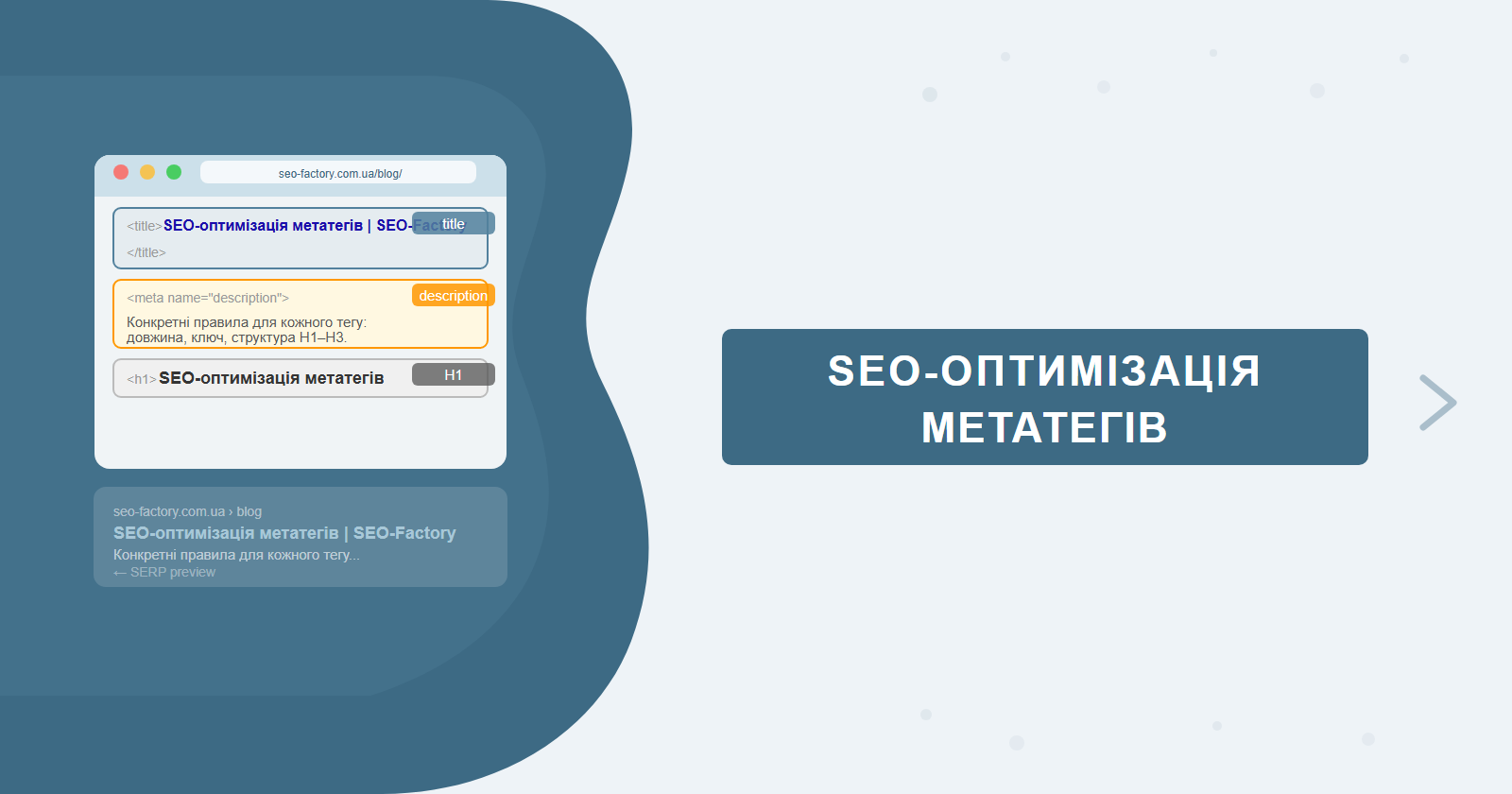
Meta tags are the first thing both Google and the user see. The title tag directly influences rankings; the description influences click-through rate. Yet most sites still have duplicate, empty, or truncated meta tags — which means easy ranking gains without any link building or technical overhauls.
This guide covers concrete rules for each tag, tools for auditing your site, bulk editing workflows for popular CMS platforms, and how to handle Open Graph and meta robots correctly. If you need a full technical meta tag audit, find out about SEO promotion from SEO-Factory.
Contents
- Title tag: rules and common mistakes
- Meta description: why bother if Google rewrites it
- H1: one per page, precise, no duplicates
- H2–H3: structure and secondary keywords
- Tools for auditing meta tags
- Bulk editing meta tags in your CMS
- Open Graph and Twitter Card
- Meta robots and canonical
- Ready-to-use title and description templates
- Checklist: 10 meta tag mistakes
Title Tag: Rules and Common Mistakes
The title tag is the most important on-page SEO element after the content itself. Google uses it to understand the page topic and display it in search results. One important nuance: since 2021, Google can rewrite title tags automatically if it considers them irrelevant to the page content. A well-written title reduces the likelihood of being rewritten — it's not a reason to skip writing one.
Technical parameters
- Length: 50–60 characters (including spaces). Over 60 characters — the title is truncated in the SERP.
- Keyword: at the beginning or in the first third of the title. Words at the start carry more weight.
- Uniqueness: every page needs its own title. Duplicates signal weak site structure to Google.
- Brand: typically appended at the end after " | " or " — ".
Title templates by page type
| Page type | Template | Example |
|---|---|---|
| Service / category | Keyword + benefit + brand | SEO Website Promotion: from 3 months | SEO-Factory |
| Blog article | Article headline + brand | Technical SEO Audit: Step-by-Step Checklist | SEO-Factory |
| Homepage | Brand + key USP | SEO-Factory — Website Promotion in Ukraine |
| Product page | Name + spec + store | iPhone 15 Pro 256GB Buy | Store Name |
Meta Description: Why Bother If Google Rewrites It
The meta description does not directly affect rankings. But a well-written description improves CTR in the SERP — and CTR is an indirect signal for Google. Moreover, if the description matches the query, Google is significantly more likely to use it rather than pulling an arbitrary snippet from the page text.
Parameters
- Length: 140–160 characters. Shorter — you're wasting potential; longer — it gets truncated.
- Keyword: naturally included in the first sentence. Google bolds it when it matches the search query.
- Call to action: "discover", "order", "see" — without hard selling.
- Uniqueness: as with title — never copy across pages.
When does Google rewrite descriptions? When your description doesn't match the query intent or is too generic. Fix: write descriptions for the specific intent of each page, not catch-all phrases like "learn more on our website". Google explains what it looks for in its guide to controlling snippets.
H1: One Per Page, Precise, No Duplicates
The H1 is the main on-page heading. It is not the same as the title tag, though they're often confused. Title = for search results. H1 = for the user on the page.
- One H1 per page. Multiple H1s aren't a critical error, but Google may misread the primary topic.
- Contains the primary keyword or a natural paraphrase.
- Does not duplicate the title word-for-word. Title is short and keyword-focused. H1 is expanded and readable.
- Matches the page content. Clickbait headlines that don't reflect the content are a low-quality signal.
H2–H3: Structure and Secondary Keywords
H2–H3 headings structure content for readers and help Google understand the page's subtopics. Secondary keywords and LSI terms fit naturally into H2–H3 without the need to overload the main body text.
- H2 — main sections of the article or page. Include mid-frequency keywords where natural.
- H3 — subsections within H2 blocks. Question formats ("How to…?", "What is…?") align well with featured snippets.
- H4–H6 — for complex documentation; not needed for typical commercial pages.
For featured snippets: if an H2 or H3 is phrased as a question, and the paragraph immediately after gives a clear answer in 40–60 words — the chances of appearing in position zero rise significantly. Especially effective for how-to instructions, checklists, and definitions.
Tools for Auditing Meta Tags
Manually checking meta tags across a large site is impractical. Specialised tools crawl the entire site and surface problematic tags automatically.
Screaming Frog SEO Spider
The most widely used desktop crawler for technical SEO. Free version handles up to 500 URLs; paid version is unlimited.
How to set up and what to look for:
- Launch Screaming Frog, enter your domain, and click Start. Wait for the crawl to complete.
- Go to the Page Titles tab: filter by "Missing" (empty titles), "Duplicate" (duplicates), "Over 60 Characters" (too long), "Below 30 Characters" (too short).
- Go to the Meta Description tab: same filters — Missing, Duplicate, Over 160 Characters, Below 70 Characters.
- H1 tab: identify pages missing an H1, pages with multiple H1s, or H1 duplicates across pages.
- Export to CSV for easy analysis in a spreadsheet.
Useful Screaming Frog feature: Custom Search mode lets you find meta tags containing a specific word or pattern — for example, all titles starting with "Home" or "Untitled". This is a common issue after migrations or bulk page imports.
Google Search Console for meta tag auditing
GSC doesn't show meta tags directly, but provides critical indirect information:
- Performance → Search results → Pages: pages with low CTR despite a strong position (spots 3–8) signal ineffective title or description. These are the first pages to rewrite.
- Coverage: indexing errors are often connected to meta robots or canonical problems.
- Enhancements: if you use structured data — GSC flags markup errors that affect how your snippets appear.
Ahrefs Site Audit
A cloud-based crawler from Ahrefs. After the crawl it generates a prioritised report of issues. For meta tags, look at the "On-page" section: duplicate titles and descriptions, missing tags, values that are too long or too short. The tool automatically assigns a severity score to each issue.
Bulk Editing Meta Tags in Your CMS
On sites with hundreds or thousands of pages, editing each title manually is not realistic. Use templates and batch editing in your CMS.
WordPress + Yoast or Rank Math
Both Yoast SEO and Rank Math support title and description templates. You define a formula using variables that automatically generate meta tags:
%%title%%— post or page name%%category%%— category%%sitename%%— site name%%sep%%— separator character (|, —, etc.)
Example template for WooCommerce categories: %%title%% — Shop Online | %%sitename%%. For blog posts: %%title%% | %%sitename%%.
Yoast's Bulk Editor (SEO → Tools → Bulk Editor) lets you view and edit titles and descriptions for all pages in a single list — without opening each post individually.
Other platforms
Most e-commerce and CMS platforms support meta tag export/import via CSV. The workflow is consistent: export a spreadsheet with current URLs and meta values → edit titles and descriptions in bulk → re-import. For platforms like Shopify, OpenCart, or Magento, look for built-in CSV import tools or dedicated SEO plugins that support batch meta editing.
Template for product category pages: [Category name] — Buy Online: Prices from $X | [Brand]. This template includes the primary keyword (category name + "buy"), a price reference, and the brand — three elements that consistently improve CTR in commercial search results.
Open Graph and Twitter Card
Open Graph (OG) and Twitter Card are meta tags that control how a page appears when shared on social networks and messaging apps. They don't directly influence SEO rankings, but they're critical for CTR when content is shared on Facebook, Telegram, LinkedIn, and Twitter/X.
Core Open Graph tags
- og:title — the headline shown on share previews. Can differ from your SEO title: this is where you can be more engaging and benefit-focused.
- og:description — the description shown under the headline. 150–300 characters.
- og:image — the preview image. Recommended size: 1200×630 px. File size under 8 MB. Use a dedicated, high-quality image — not a random product photo.
- og:url — the canonical URL of the page.
- og:type — content type: website, article, product.
Complete Open Graph code example
<meta property="og:title" content="SEO Meta Tag Optimisation: Title, Description, H1–H3">
<meta property="og:description" content="Concrete rules for every tag, audit tools, and bulk editing workflows. Checklist of 10 most common meta tag mistakes.">
<meta property="og:image" content="https://seo-factory.com.ua/images/metatags-preview.jpg">
<meta property="og:image:width" content="1200">
<meta property="og:image:height" content="630">
<meta property="og:url" content="https://seo-factory.com.ua/en/blog/seo-meta-tags/">
<meta property="og:type" content="article">
<meta property="og:locale" content="en_US">
<meta name="twitter:card" content="summary_large_image">
<meta name="twitter:title" content="SEO Meta Tag Optimisation: Title, Description, H1–H3">
<meta name="twitter:image" content="https://seo-factory.com.ua/images/metatags-preview.jpg">
Note the og:locale tag — set it to match your page language (e.g., en_US or en_GB). Facebook uses this to determine the language for sharing UI elements. Adding explicit og:image:width and og:image:height helps Facebook and LinkedIn render previews faster and correctly, without needing to download and analyse the image dimensions themselves.
How to validate OG tags before publishing
- Facebook Sharing Debugger (developers.facebook.com/tools/debug) — shows exactly how the page appears on Facebook and lets you clear the preview cache after updating OG tags.
- LinkedIn Post Inspector (linkedin.com/post-inspector) — equivalent tool for LinkedIn previews.
- Telegram — paste the link into any chat and inspect the preview manually. Telegram caches previews for a short period, so test with a fresh link if you've recently updated tags.
- Screaming Frog → Custom Extraction tab: configure extraction of
og:title,og:description, andog:imageto audit the entire site in one crawl.
Most common OG issue: images are uploaded at 300×200 pixels or in portrait orientation, causing them to appear cropped or tiny in share previews. Always prepare dedicated OG images at exactly 1200×630 px. Don't rely on automatic cropping by the browser or social platform — it won't reliably produce good results.
Twitter Card
Twitter (now X) uses its own tags but falls back to OG data if they're absent. The key tag is twitter:card with type summary_large_image — this shows a large image alongside the link, significantly increasing recognition and clicks. Recommended image size for Twitter: 1200×628 px.
If a page has no og:image, or the image is the wrong size, Facebook and Telegram will either pick a random image from the page or display the link without any preview. This dramatically reduces social click-through rates — and it's a completely avoidable issue.
Meta Robots and Canonical
Meta robots and canonical are two tags that control how search crawlers interact with a page. Using them incorrectly can block important pages from being indexed or cause link equity to leak across duplicate URLs.
Meta robots: index/noindex and follow/nofollow
The <meta name="robots" content="..."> tag in the page <head> gives crawlers instructions. Core values:
- index, follow — (default) index the page and follow links. No need to write this explicitly.
- noindex, follow — don't index the page, but follow its links. Use for: pagination pages, account dashboards, shopping cart pages, thin or duplicate content pages.
- noindex, nofollow — full isolation from crawlers. Use for: admin panels, internal service pages.
- index, nofollow — rarely used. For pages linking to untrusted resources where you don't want to pass link equity.
Canonical: declaring the authoritative URL
The canonical tag (<link rel="canonical" href="URL">) tells Google which version of a page is the "original" when multiple URLs serve identical or near-identical content.
| Situation | Solution | Why |
|---|---|---|
| URL parameters (?sort=price, ?page=2) | Canonical pointing to the base URL | Parameters create duplicates; Google needs to know the canonical version |
| HTTP and HTTPS versions | Canonical + 301 redirect to HTTPS | A canonical without a redirect is a weaker signal |
| www and non-www | Canonical + 301 redirect to chosen version | Both versions must resolve to the same URL |
| Pagination pages (/page/2/) | Canonical to page 1 or self-referencing | Depends on whether each page has unique content |
| Syndicated content | Canonical pointing back to the original | If your content is republished elsewhere — request a canonical to your URL |
Noindex vs canonical: they're not the same
These are not interchangeable tools. Noindex removes a page from the index but doesn't resolve duplicate content or link equity issues. Canonical tells Google "this is the original" without immediately removing the duplicate from the index. For parameter-based duplicates, use canonical. For service pages that should never appear in search, use noindex.
Common mistake: noindex and canonical set simultaneously on the same page. These are contradictory instructions. Google may ignore the canonical for noindex pages since it doesn't know which instruction to act on first. Pick one — not both.
Ready-to-Use Title and Description Templates
Instead of starting from scratch each time, use these tested templates as a starting point for each page type.
| Page type | Title template | Description template |
|---|---|---|
| Homepage | [Brand] — [Key USP] for [Target audience] | [Short USP in 1–2 sentences]. [CTA]: [link to service or contact page]. |
| Service category | [Service] in [Location]: from $X | [Brand] | Order [service] from [Brand]: [key advantage]. Free consultation — [CTA]. |
| Blog article | [Article topic]: [clarifying subtitle] | [Brand] | [What the article covers in 1 sentence]. Discover [specific reader benefit] — read more at [Brand]. |
| Product page | [Product name] [spec] — Buy at [Store] | Buy [product name] for $[price] with fast shipping. [Feature or benefit]. In stock — order now. |
| Contact page | Contact [Brand]: Phone, Address, Email | Get in touch with [Brand]: [phone], [email]. Office in [city]. We respond within [timeframe]. |
| 404 page | Page Not Found — 404 | [Brand] | Sorry, the page you're looking for doesn't exist. Return to [homepage] or search the site. |
Templates are a starting point, not a rigid rule. Adapt them to your niche, brand voice, and competitive landscape. The constants: keyword near the start of the title, and a clear intent-matched message in the description.
Checklist: 10 Meta Tag Mistakes
| # | Mistake | Consequence | Fix |
|---|---|---|---|
| 1 | Duplicate titles on multiple pages | Cannibalization in the SERP | Unique title for every URL |
| 2 | Title longer than 60 characters | Truncated in search results | Shorten without losing the keyword |
| 3 | Empty or auto-generated title | Google substitutes H1 or URL | Write manually or via CMS template |
| 4 | Keyword at the end of title | Weaker relevance signal | Move keyword to the beginning |
| 5 | Missing meta description | Google pulls a random snippet | Write a unique, intent-matched description |
| 6 | Duplicate descriptions | Different pages look identical in the SERP | Unique description per page |
| 7 | Multiple H1 tags on one page | Google loses the primary topic signal | Keep only one H1 |
| 8 | H1 = title verbatim | Missed opportunity to expand semantics | Rephrase the H1 |
| 9 | Heading hierarchy gaps (H1 → H4) | Poor readability and structure | Follow H1→H2→H3 order |
| 10 | Keyword stuffing in title/H1 | Risk of over-optimisation filter | One keyword + natural text |
A meta tag audit is not a one-time event. Whenever new pages are added, site structure changes, or semantics are updated, meta tags need to be reviewed alongside the content.
Structured Data and Its Impact on Snippets
Structured data (schema.org markup) is not a meta tag in the traditional sense, but it directly shapes how your snippet looks in the SERP. Rich results — star ratings, pricing, breadcrumbs, FAQ accordions — make your result more prominent than neighbouring entries even if your position is identical.
The most impactful schema types for commercial sites:
- Product — price, rating, availability for product pages. Star ratings in the SERP typically increase CTR by 15–30% compared to a plain blue link.
- FAQ — expands two or three questions directly below the snippet in the SERP, effectively doubling the vertical space your result occupies without changing position.
- BreadcrumbList — displays the site hierarchy in the URL line of the snippet. Increases trust and CTR, especially for unfamiliar brands.
- Article — for blog content: publication date and author. Google News uses this type for news carousel inclusion.
- LocalBusiness — address, opening hours, phone. Essential for local SEO visibility.
Validate your markup using Google's Rich Results Test — it shows which rich result types are eligible for the page and surfaces any markup errors. The Enhancements section in GSC also lists Schema errors that need fixing before rich results can appear.
Important: structured data does not replace well-written meta tags. Title and description remain the foundation of the snippet. Schema markup enriches the snippet for pages where the meta tags are already correct. Get the fundamentals right first — then layer schema on top. A perfectly marked-up page with a truncated or duplicate title is still underperforming.
Step-by-Step GSC + Screaming Frog Audit Workflow
Combining GSC with Screaming Frog gives you the fastest path from raw data to prioritised fixes — even on sites with thousands of pages. Here is a practical sequence:
- GSC → Performance → Pages: sort by impressions. Flag the top 50 pages by traffic — these are the highest-ROI targets for meta tag improvements.
- Identify pages with CTR below 2% at positions 4–10. Even a modest title rewrite can lift CTR by 0.5–1%. On a page with 10,000 monthly impressions that translates to hundreds of additional clicks at no extra cost.
- Screaming Frog: load the URL list exported from GSC (Export → CSV) or crawl the full domain. Compare titles against GSC data — pages where Google has rewritten your title signal that the original was not well-matched to the page content.
- "Title Modified by Google" filter in Screaming Frog (v19+) surfaces exactly those pages where Google substituted its own title. Treat this as a direct signal that a rewrite is needed.
- Prioritise: fix pages with the highest impressions and the lowest CTR first — this is where meta tag work has the greatest measurable impact.
Frequently Asked Questions
How many characters should a page title have?
The optimal title length is 50–60 characters (up to 600px). Google truncates longer titles in the snippet. Place the target keyword at the beginning and your brand name at the end, separated by a dash or pipe.
Does Google rewrite meta descriptions?
Yes, Google rewrites meta descriptions in about 70% of cases, selecting a text snippet that best matches the query. That said, writing descriptions is still worthwhile — they appear when the query matches, influence CTR, and serve as a relevance signal.
Can a page have multiple H1 tags?
HTML5 technically allows multiple H1 tags, but SEO best practice is one H1 per page. Google officially says multiple H1s don't hurt, but a single clear H1 better signals the page's main topic.
What is a canonical tag and why is it needed?
A canonical tag (<link rel="canonical">) tells Google which version of a page is the primary one when duplicates exist — for example, HTTP vs HTTPS, or URLs with and without UTM parameters. It consolidates all PageRank to the canonical URL.
Found issues with your meta tags?
SEO-Factory runs technical meta tag audits as part of full-cycle SEO promotion: we identify duplicates, empty tags, truncated titles, and incorrect canonical settings — and write the correct structure for every page. We also set up Open Graph and meta robots across the full site.