Your shopping cart is empty!
Orphan pages have no internal links — Googlebot can't reach them through crawling, so they don't get indexed and bring zero traffic. Here's a 7-step checklist: from finding them with Screaming Frog and GSC to fixing each type with a decision table.
Contents
- What is an orphan page and why it's an SEO problem
- Why Googlebot doesn't find these pages
- Case study: 200 orphan pages on an e-commerce site
- How to find orphan pages: tools
- 7-step checklist: from discovery to fix
- Types of orphan pages: intentional vs accidental
- Decision table: what to do with each type
- FAQ
What is an orphan page and why it's an SEO problem
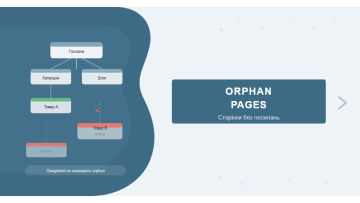
An orphan page is a URL with zero internal links pointing to it from any other page on the site. The page exists technically, but it's completely cut off from the rest of the site's structure.
The problem isn't just user discoverability — Googlebot ignores these pages too. Google's crawler moves through a site by following links. If a URL has no incoming links, the crawler simply won't visit it. The result: no indexing, no rankings, no traffic.
Based on our technical audits, an average of 9–15% of URLs on mid-size e-commerce sites turn out to be orphan pages. Most site owners have no idea this is happening.
Why Googlebot doesn't find these pages
Google uses two main methods to discover pages: crawling through links and XML sitemaps. Orphan pages are invisible to the first method, and if they're also missing from the sitemap — they're invisible to the search engine altogether.
Even when an orphan page is included in a sitemap, that's no guarantee of indexing. Googlebot may see the URL but assign it a very low priority: with no internal links, the page receives no PageRank from the rest of the site. Google might crawl it once and decide not to index it due to lack of context and low authority signals.
One of our clients was regularly publishing new landing pages through a separate system. They were automatically added to the sitemap — but none had any internal links. After 6 months, only 7 out of 40 landing pages were indexed.
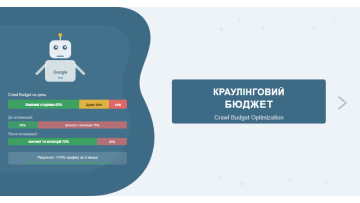
There's a third reason: crawl budget. For large sites, Google allocates a limited resource for crawling. Pages without links get the lowest priority and are often deferred indefinitely. See our article on technical SEO auditing for more on crawl budget management.
Case study: 200 orphan pages on an e-commerce site — +45% indexed in 3 weeks
One of our clients runs an online building materials store with around 4,800 product pages. During a technical audit, we found that 214 category and filter pages had no internal links at all — leftovers from a 2023 redesign where navigation changed but old URLs were left without new links pointing to them.
GSC confirmed: of those 214 pages, only 89 were indexed (41%). The rest showed "Discovered — currently not indexed."
What we did:
- Ran a Screaming Frog crawl and compared with sitemap — identified all 214 URLs.
- Classified: 140 pages were relevant categories, 74 were outdated filter pages.
- For 140 categories — added links from main navigation and "Related categories" blocks on relevant pages.
- For 74 outdated filters — 301 redirects to current equivalents.
Results after 3 weeks: 128 of the 140 interlinked pages were indexed (91.4% — versus 41% before). Organic traffic to those pages grew by +38% in the first month post-indexation.
How to find orphan pages: tools
Screaming Frog + XML sitemap (primary method)
The most accurate free approach for sites under 500 pages:
- Start the crawl — open Screaming Frog Spider, enter your domain, click Start.
- Load your sitemap — after crawling: Sitemaps → Download XML Sitemap. Or manually import from /sitemap.xml.
- Compare the lists — in Bulk Export → All Inlinks, apply the "No Inlinks" filter. These are your orphan pages.
- For large sites — use Screaming Frog in List Mode: upload all sitemap URLs and the crawler checks each one for incoming internal links.
Tip: Screaming Frog is free for up to 500 URLs. Larger sites need a license (~£199/year) or one of the alternatives below.
Google Search Console — free verification
GSC doesn't give you a direct orphan pages list, but it helps confirm them:
- Indexing → Pages → "Discovered – currently not indexed" — orphan pages frequently appear here.
- "Crawled – currently not indexed" — Google found the page but chose not to index it.
- Cross-reference this list with Screaming Frog's "No Inlinks" results — overlapping URLs are your highest-priority fixes.
How to read GSC indexing reports and find problematic pages — in our Google Search Console guide.
Ahrefs Site Audit — automated detection
If you have Ahrefs access: Site Audit → All issues → Orphan pages (no inlinks). The tool automatically finds sitemap URLs with no internal links pointing to them. Additionally: Pages → Orphan pages shows the full list with metrics — traffic, keyword count, URL Rating.
According to Ahrefs research, an average of 26% of pages across websites are orphan pages. On large e-commerce sites, that share can reach 40%.
7-step checklist: from discovery to fix
- Crawl the site — run Screaming Frog or Ahrefs Site Audit. Wait for completion and save the report.
- Compare with the sitemap — sitemap URLs not discovered through crawling are orphan candidates. In Screaming Frog: Reports → Orphan URLs (Sitemap).
- Cross-check in GSC — "Discovered – not indexed" and "Crawled – not indexed" statuses confirm the problem.
- Classify each page — sort into: valuable content, technical pages (thank-you, custom 404), outdated pages.
- Find link donors — for each orphan page, identify 2–3 relevant pages that logically could link to it.
- Apply the fix — add internal links, noindex, or 301 redirect depending on the page type. See the decision table below.
- Monitor results — check GSC 3–4 weeks later. Schedule a repeat orphan page audit every quarter, or after any significant redesign or CMS change.
From our experience: The easiest way to automate orphan page detection is to run Ahrefs Site Audit on a schedule and set up email alerts for new "Orphan pages (no inlinks)" issues. That way you skip the manual quarterly audit.
Types of orphan pages: intentional vs accidental
Not every orphan page is a mistake. Some exist by design. Understanding the difference matters — you don't want to "fix" something that's working as intended.
Intentional orphan pages
- Thank-you pages — post-form confirmation pages. No indexing needed, and no one links to them intentionally.
- PPC landing pages — often kept deliberately isolated to prevent traffic dilution. Still need noindex.
- Login / cart pages — technical URLs that shouldn't rank.
- A/B test variants — alternate page versions active only during a test.
Accidental orphan pages
- Post-redesign leftovers — the most common case. Navigation changed, but old URLs stayed live without new links.
- Auto-generated pages — archives, tag pages, e-commerce filters, pagination without links.
- New content without structure — a content manager created the page but never added a link to it from anywhere.
- After URL migration — old URLs become orphans when site structure changes without proper redirects.
In our experience, roughly 70% of orphan pages are accidental. The remaining 30% are intentional, but most of those still need a noindex tag.
Decision table: what to do with each page type
| Orphan page type | Intentional / Accidental | Recommended action | Priority |
|---|---|---|---|
| Useful article / category with no links | Accidental | Add internal links from relevant pages | High |
| Product page missing from catalogue links | Accidental | Add to category / navigation | High |
| Thank-you page / form confirmation | Intentional | Add noindex | Medium |
| PPC landing page (not for organic) | Intentional | Add noindex | Medium |
| Outdated content, duplicate page | Accidental | 301 redirect to current version | Medium |
| Empty archives, tagless tag pages | Accidental | noindex or delete | Low |
| Pagination pages without navigation links | Technical | Fix pagination structure, add links | Medium |
| Old URLs after structure change, no redirect | Accidental | 301 from old URL to new | High |
We include orphan page analysis and internal link structure review in every technical SEO audit we run. For larger sites, we recommend treating orphan page audits as a standalone quarterly task — especially after CMS changes or navigation updates.
How to build a proper internal link architecture to prevent orphan pages from appearing — in our article on internal linking.
If you want to understand how orphan pages fit into a complete website promotion strategy, see our overview of full-cycle SEO.
In Practice
A manufacturing company in Lviv — industrial equipment, roughly 140 product lines — came to us four months after a full rebranding. Their CMS had built a new catalogue structure from scratch but never connected the old product pages to it. All 140 legacy product URLs still existed, were listed in the sitemap, and had valid content.
None had a single internal link pointing to them from the new catalogue. GSC had been showing every one of them as "Discovered — currently not indexed" for the entire four months since launch.
The audit used two tools: Screaming Frog confirmed zero inbound internal links on each of the 140 pages; GSC provided the indexation status per URL. The fix was manual — one to two catalogue links added per product section, connecting new category cards to their corresponding legacy product pages. Within 3 weeks, all 140 pages moved to indexed status. Organic impressions on product-level queries grew by +52% in the first five weeks after indexation, with no content changes made.
A CMS rebranding builds new pages — it does not rewire old ones. If your old product URLs existed before the migration, assume they are orphans until Screaming Frog proves otherwise. Waiting four months for GSC to confirm the problem is four months of lost indexation you will not recover.
FAQ
What is an orphan page in SEO?
An orphan page is a URL with no internal links pointing to it from other pages on the site. Googlebot can only find it via XML sitemap or a direct URL — without internal links, the page receives no PageRank and often goes unindexed.
Do orphan pages hurt SEO?
Yes. Orphan pages are cut off from PageRank flow, have a lower probability of being indexed, and waste crawl budget — especially critical for large e-commerce sites with thousands of URLs.
How do I find orphan pages for free?
Crawl your site with Screaming Frog (free up to 500 URLs) and compare the results with your XML sitemap. URLs in the sitemap not found through crawling are orphan page candidates. Also check GSC → Indexing → Pages → "Discovered – currently not indexed."
What should I do with orphan pages once found?
Three options: 1) Add internal links from relevant pages — best for valuable content. 2) Add noindex — for pages that serve a technical purpose but shouldn't rank. 3) Set up a 301 redirect and remove the page — for outdated content with no remaining value.
Found orphan pages but unsure where to start?
We'll run a full technical audit: find all isolated pages, classify them, and deliver a prioritised fix plan.