Your shopping cart is empty!
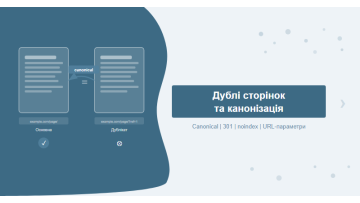
Duplicate pages are two or more URLs serving identical or near-identical content. Google splits PageRank between them and struggles to decide which version to rank. The fix — canonical tag, 301 redirect, or noindex — depends on the duplicate type. Below is a full checklist with tools and CMS-specific cases.
Contents
- What duplicate pages are and why they hurt SEO
- Types of duplicates: technical, content-based, parametric
- How to find duplicates: Screaming Frog, Ahrefs, GSC
- Canonical tags — when and how to use them correctly
- 301 redirect vs canonical: which to choose
- noindex for duplicates — a dangerous tool
- URL parameters: UTM, sorting, filters — how to handle them
- Duplicates in CMS: WordPress, OpenCart, Magento
- Pagination and duplicates — a common pitfall
- Frequently asked questions
What duplicate pages are and why they hurt SEO
A duplicate page is any URL that returns substantially similar or identical content to another URL on the same site. Google identifies duplicates not just by text — it compares title tags, meta descriptions, the main content block, and markup structure.
The problem isn't that duplicates exist — Google is reasonably good at detecting them. The real issue is what they cost you:
- PageRank dilution. Backlinks may point to different versions of the same URL — /page/, /page/index.html, /page?ref=nav. Link equity is split between them instead of consolidating on one version.
- Crawl budget waste. Googlebot crawls duplicates instead of unique pages. For large sites with 50,000+ URLs, this is a serious bottleneck.
- Index ambiguity. Google selects which version to show — and it's often not the one you'd prefer.
- Keyword cannibalism. Two near-identical pages compete for the same queries, suppressing each other's rankings.
In our auditing work, the most common cause of traffic loss after a site migration is uncontrolled duplication — old URLs remain accessible while new ones are added, and both versions end up indexed with split backlink profiles.
Types of duplicates: technical, content-based, parametric
Understanding the type of duplicate determines the correct fix. Here is the classification we apply in every audit:
| Duplicate type | Cause | Typical example | Fix |
|---|---|---|---|
| HTTP vs HTTPS | Missing redirect after SSL migration | http://site.com and https://site.com both return 200 | 301 redirect HTTP → HTTPS |
| www vs non-www | No canonical domain set in server config | site.com and www.site.com both respond with 200 | 301 redirect + canonical |
| Trailing slash | Server does not normalise URLs | /page/ and /page treated as different URLs | Server-level normalisation + canonical |
| URL parameters | Sorting, filters, UTM tags, session IDs | /catalog?sort=price, /catalog?utm_source=fb | Canonical + GSC parameter settings |
| Pagination | First page of category accessible via two URLs | /blog/ and /blog/?page=1 — identical content | Canonical /blog/?page=1 → /blog/ |
| Language versions without hreflang | Same content under multiple language prefixes | /en/page/ and /page/ — same content | hreflang + self-referencing canonical per version |
| Content duplicates | Categories and tag pages share the same posts | /category/phones/ and /tag/smartphones/ | noindex on tags or canonical → category |
| Print versions | CMS generates /print/ or ?print=1 for each page | /article/seo/ and /article/seo/print/ | noindex or canonical → original |
Hidden type — Session ID duplication. Some CMS platforms append a session identifier (?sid=abc123) to every URL, generating a unique URL for each visitor. Screaming Frog won't always catch these — check your server access logs directly.
How to find duplicates: Screaming Frog, Ahrefs, GSC
Three sources together give the complete picture — a crawler, an external audit tool, and data directly from Google.
Screaming Frog SEO Spider (fastest starting point):
- Start a crawl: Configuration → Spider → enable Store HTML and Check Hashes.
- After crawling, open the Duplicate Pages tab — URLs sharing the same MD5 content hash are listed here.
- The Page Titles → Duplicate tab catches pages with identical title tags even when body content differs slightly.
- The Meta Description → Duplicate tab gives an additional signal of shallow or templated pages.
Ahrefs Site Audit:
- Site Audit → Issues → search for duplicate.
- Key issues to check: Duplicate pages, Duplicate title tags, Pages with conflicting canonical.
- Filter by HTTP status 200 — these are active duplicates being actively crawled.
Google Search Console:
- Indexing → Pages → look for the reason "Duplicate without user-selected canonical" — Google chose its own preferred version.
- Reason "Duplicate, submitted URL not selected as canonical" — you submitted it in Sitemap, but Google overrode you.
- Reason "Alternate page with proper canonical tag" — the canonical worked as intended.
From our practice: auditing an e-commerce site in consumer electronics (2024, ~8,000 pages), we found 1,200+ duplicates — mostly generated by colour and size filter combinations. After correctly configuring canonical tags and GSC parameters, organic traffic grew 34% over three months with zero content changes.
For large sites (50,000+ URLs), start with GSC — it shows Google's actual behaviour, not hypothetical crawling issues. Then use Screaming Frog to fill in the gaps.
Canonical tags — when and how to use them correctly
The canonical tag (<link rel="canonical" href="...">) signals to Google: "this page is a copy — the preferred version is over here." For a deep dive into implementation rules and common mistakes, see our article on canonical tag best practices and errors.
Canonical rules you cannot break:
- Use absolute URLs: always include the full path with protocol —
https://site.com/page/, not/page/. - Self-referencing canonical on every unique page: the canonical should point to itself. This guards against accidental parameter duplication by ad platforms or analytics tools.
- Never combine canonical and noindex: these are contradictory signals. Google ignores canonical tags on noindex pages.
- Canonical and hreflang: for multilingual sites, each language version's canonical should point to itself — not to the main language version. Use hreflang for cross-referencing between languages.
- Canonical in HTTP header: for non-HTML resources such as PDFs, pass canonical via the HTTP response header:
Link: <URL>; rel="canonical".
Canonical is a hint, not a command. If GSC shows Google selected a different page as canonical than the one you specified, that means the duplicate has stronger signals — more backlinks, better engagement. In that case, a 301 redirect is the only way to enforce consolidation.
301 redirect vs canonical — which to choose
The decision comes down to one question: should the duplicate URL ever be accessible to users? If not — 301 redirect. If yes, but you want to consolidate SEO signals — canonical.
| Criterion | Canonical | 301 Redirect | noindex | GSC Parameters |
|---|---|---|---|---|
| Signal type for Google | Hint (advisory) | Directive (enforced) | Directive (deindex) | Hint (Googlebot only) |
| URL accessible to users | Yes | No (redirected) | Yes | Yes |
| PageRank transfer | Yes (~100%) | Yes (~99%) | No | Depends on config |
| Impact on crawl budget | Duplicate still crawled | Googlebot follows redirect | Crawled but not indexed | Googlebot may skip parameter |
| Best use case | Parametric URLs, pagination, print versions | Site migrations, page merges, HTTP→HTTPS | Admin pages, site search results | UTM, sorting and filter params in shop |
| Risk | Google may override your choice | Redirect chains slow down crawling | Accidentally blocking important pages | Legacy tool — may be removed from GSC |
| Implementation effort | Low (HTML tag) | Medium (.htaccess / nginx) | Low (meta robots) | Medium (GSC + validation) |
Our decision algorithm in practice: if both versions have backlinks — use a 301 redirect. If the duplicate is dynamically generated and has no external links — canonical. If the page has no SEO value at all (e.g., site search results) — noindex or robots.txt block.
noindex for duplicates — a dangerous tool
The <meta name="robots" content="noindex"> tag removes a page from Google's index but does not transfer its PageRank anywhere. That's the key trap: you hide the duplicate but lose all the link equity it carried.
When noindex is appropriate for duplicates:
- Site search result pages — /search?q=... URLs have no SEO value and receive no external backlinks.
- Cart and checkout pages — should never be indexed.
- Admin and account pages — /wp-admin/, /account/, /wishlist/ should be excluded from the index.
- Tag pages that mirror categories — if a tag fully duplicates a category and receives no traffic, noindex is acceptable.
When noindex is a mistake:
- On paginated pages — prefer canonical or allow indexing.
- On faceted navigation pages that have external backlinks.
- On any page where valuable backlinks exist — you lose that equity permanently.
Important distinction: noindex controls indexation, not crawling. Googlebot still visits the page to read the tag. If you want to save crawl budget, add the URL to Disallow in robots.txt — but then noindex won't be read. Choose one approach, not both.
URL parameters: UTM, sorting, filters — how to handle them
URL parameters are the most common source of mass duplication on e-commerce sites. A single catalogue page with 10 filter options and 3 sort orders generates 30+ near-identical URLs.
Parameter types by content impact:
- Do not change content: utm_source, utm_medium, utm_campaign, ref, affiliate_id, fbclid, gclid. Always handle these — add self-referencing canonical or block in robots.txt.
- Change order but not content: sort=price, order=asc, view=grid. Add canonical pointing to the base URL without the parameter.
- Substantially change content: color=red, size=xl, brand=samsung. These may have genuine SEO value — evaluate individually before deciding.
- Technical parameters: sid=, sessionid=, phpsessid=. Always block — and ideally prevent the CMS from generating them altogether.
Three approaches to handling parametric duplicates:
- Canonical on each parametric URL — points to the base URL. The simplest solution for UTM and session IDs.
- GSC URL Parameters (Legacy tools) — tell Google a parameter doesn't change content. Works for Googlebot only, not Bing or other crawlers.
- Block in robots.txt —
Disallow: /*?sort=. Most aggressive option; stops all crawling of those URLs.
Duplicates in CMS: WordPress, OpenCart, Magento
Each CMS generates its own characteristic duplicate patterns. Knowing them in advance cuts audit time significantly.
WordPress:
- Archive overlaps: /category/news/, /tag/seo/, /author/admin/ can all display the same posts. Fix: Yoast SEO or RankMath → set noindex on tag and author archives.
- ?p=123 alongside permalink: WordPress maintains numeric IDs in parallel with pretty permalinks. Confirm that ?p=123 redirects to the canonical permalink.
- Feed pages: /feed/, /comments/feed/ are technical duplicates. Disable feed indexation in Yoast → Search Appearance.
- Attachment pages: WordPress creates a separate page for every uploaded image. Fix via Yoast → Media → Redirect attachment URLs to the attachment itself.
OpenCart:
- ?route= vs SEO URL: OpenCart generates two URLs for every page by default. Ensure SEO URLs are enabled and ?route= variants redirect to the clean URL.
- Search result URLs: /index.php?route=product/search&search=... creates thousands of unique URLs. Close via robots.txt:
Disallow: /index.php. - Category pagination: /category/?page=1 and /category/ — add canonical on every pagination page.
- Product variants: if variants have separate URLs, add canonical from each variant URL to the main product page.
Magento:
- Store views: if different store views serve the same content, configure canonical for each view explicitly.
- Layered navigation: filter combinations multiply URLs exponentially. Magento 2 has built-in canonical for category pages — check under Catalog → SEO.
- Separate /m/ mobile site: if you run a dedicated mobile subdirectory, implement hreflang + canonical, or migrate to responsive design.
Pagination and duplicates — a common pitfall
Pagination is one of the most frequent sources of duplicates — and one of the most misunderstood SEO topics. Since Google dropped rel="prev/next" support in 2019, the recommended approach has changed.
What Google recommends now: allow all paginated pages to be indexed if they contain genuinely unique content (different products or articles). Google will cluster them and rank page 1 for broad queries while ranking deeper pages for queries that match their specific content.
Where pagination genuinely creates duplicate problems:
- /category/ and /category/?page=1 — identical content. Fix: canonical from /category/?page=1 → /category/, or a 301 redirect.
- Empty pagination pages — if /category/?page=50 returns 200 when only 30 pages exist, configure a 404 or 301 to the last real page.
- Pagination combined with sort parameters — /category/?page=2&sort=price and /category/?page=2&sort=name are near-identical. Canonical on /category/?page=2 without the sort parameter.
A real case from our work: a furniture e-commerce site had 520 pagination pages for the "Sofas" category. Page 1 and ?page=1 were duplicated. Another 15 pages beyond the actual catalogue returned status 200 with empty content. After fixing (canonical for page 1 overlap + 404 for empty pages), crawl budget dropped 18% and Google began discovering new products faster.
For a full walkthrough of finding these and other technical issues, see our step-by-step technical SEO audit guide.
Google's official guidance on consolidating duplicate URLs is documented in their Search documentation for developers.
In Practice
A Ukrainian news outlet with roughly 2.5 million monthly unique visitors approached us after noticing that their Ukrainian-language content was practically invisible in search despite having a large editorial team producing daily output. The site ran on a custom CMS and published every article in two language versions — Russian under /ru/ and Ukrainian under /uk/. A GSC audit revealed the core problem immediately: 1,800 articles existed in both language versions with no canonical tags and no hreflang implementation anywhere on the site. Google was indexing both versions at random — sometimes surfacing the Russian copy, sometimes the Ukrainian one, with no consistency.
Screaming Frog confirmed that 74% of the Ukrainian-language URLs appeared in GSC under "Duplicate without user-selected canonical."
The fix was structured in two phases. First, Ahrefs Site Audit was used to determine which version of each article carried stronger link equity — that version received the self-referencing canonical, establishing it as the preferred URL. Developers then implemented templated hreflang generation across the CMS: every /ru/ page received hreflang="ru" with a cross-reference to the /uk/ equivalent, and vice versa.
GSC began correctly recognising language pairs within 11 days of the next full crawl. Over the following 7 weeks, visibility of Ukrainian-language articles in Google Search grew by 90% according to Ahrefs — no new content published, no link building, just eliminating the ambiguity that had left Googlebot guessing.
The lesson this project reinforced: on a bilingual site, canonical and hreflang are not interchangeable — they are a required pair. Canonical alone does not explain language intent to Google. Hreflang alone without canonical leaves version selection to the crawler, which handles it unpredictably.
Frequently asked questions
What happens if duplicate pages are left unfixed?
Google splits PageRank across all duplicate versions — none of them will rank well. Crawl budget is wasted on redundant URLs, and backlink equity becomes diluted across inconsistent versions of the same page.
Can a canonical tag be ignored by Google?
Yes. Google treats canonical as a hint, not a directive. If the duplicate receives more backlinks or better engagement signals, Google may override your canonical preference. In those cases, a 301 redirect is the reliable fix.
How long does it take Google to process a canonical tag?
Typically 1 to 4 weeks after the next crawl. Check status in Google Search Console under Indexing — Pages — look for the reason "Alternate page with proper canonical tag".
Should every page have a canonical tag?
Yes, including self-referencing canonicals on unique pages. This protects against accidental duplication via UTM parameters, session IDs, or sorting parameters appended by third-party tools or ad platforms.
Duplicates mean lost rankings
Duplicate pages quietly drain SEO performance. Most site owners have no idea they have hundreds — sometimes thousands — of duplicates auto-generated by their CMS or appended by UTM tracking. We run a full technical audit covering all duplicate types: from HTTP/HTTPS conflicts to parametric catalogue URLs.
SEO duplicates & canonicalisation audit · SEO promotion
Learn more about surfacing these issues in our guide on working with Google Search Console.