Your shopping cart is empty!
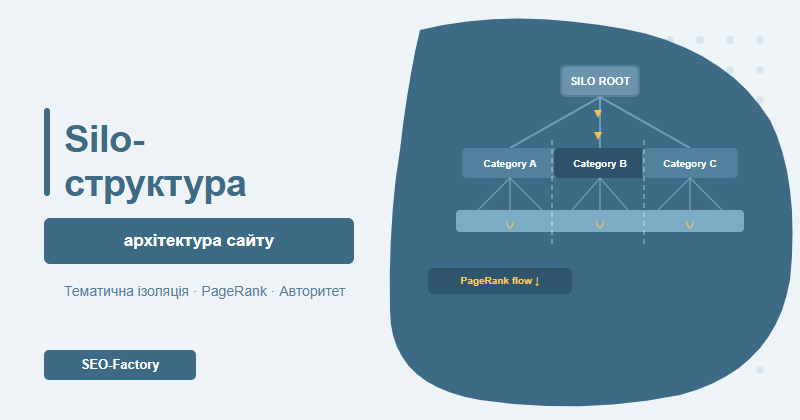
A silo structure organises your website into isolated thematic blocks, concentrating PageRank on the pages that matter most and building topical authority. Done right, it lifts rankings without buying a single new backlink.
Contents
- What is a silo structure and why it works
- How silos channel PageRank
- Physical vs virtual silos
- Silo architecture by site type
- Internal linking within and between silos
- Step-by-step implementation plan
- Common silo implementation mistakes
- Real-world results from SEO-Factory
- Frequently asked questions
What is a silo structure and why it works
The term "silo" comes from grain storage — those tall isolated cylinders where different crops are kept completely separate. In SEO, it describes a site architecture where each thematic section is kept topically isolated: the pages within a silo link to each other, but not randomly across unrelated topics.
When a site is organised into silos, each thematic block has a root page (the silo root), subcategories, and end pages — and all internal links within the block point only to topically related content. The message to Google is clear: "this section is entirely about one specific topic, and we cover it thoroughly."
Google rewards topical authority: a site that systematically and deeply covers one topic ranks higher than a site with the same number of pages that treats the topic haphazardly.
The silo concept was popularised by Bruce Clay in the early 2000s. Today's Google algorithms are far more sophisticated, but the principle of topical concentration has only grown more important — particularly with the rise of semantic search and E-E-A-T signals.
Why silo structure still matters:
- Topical relevance signals — Google identifies your site as an authority in a specific niche
- Efficient PageRank distribution — authority is not diluted across irrelevant pages
- Improved crawl efficiency — Googlebot navigates the site more logically, spending crawl budget where it matters
- Better user experience — visitors naturally find related content without dead ends
- Algorithm resilience — sites with coherent architecture are less affected by core updates
How silos channel PageRank
PageRank measures page authority through the quantity and quality of links pointing to it. While Google stopped publishing the metric publicly years ago, the principle of passing "weight" through links remains central to how rankings work.
Think of your site as a plumbing system where water is PageRank. Each link is a pipe through which water flows from one page to another. When pipes run in every direction with no plan, pressure is weak everywhere. A silo structure directs the flow toward the pages you most want to rank.
How PageRank flows in a silo
In a properly built silo, links flow in two directions:
- Upward (toward the silo root) — each article or product page links to its category, which links up to the silo root
- Downward (from the silo root) — the silo root links to subcategories and key content pages, passing a share of authority from any external backlinks it receives
In practice this means: when an external site links to your silo root, that authority cascades down through internal links to all connected pages. Deep pages gain PageRank even without direct external links pointing to them.
| Structure model | PageRank distribution | SEO effect |
|---|---|---|
| Flat (chaotic) | Even but thin | No page builds enough concentrated authority |
| Hierarchical without silos | Pools on the homepage only | Interior pages are starved of authority |
| Silo structure | Concentrated at each silo root | Every thematic block has its own authority pool |
From our experience: Sites with 5–7 clearly defined silos show 25–35% better positional visibility in thematic keyword clusters compared to structurally flat sites with the same backlink profile.
Physical vs virtual silos
There are two ways to implement silo architecture — physical and virtual. Both work, but they suit different situations and have different implementation costs.
Physical silo
A physical silo is expressed directly in the URL structure. The topical relationship between pages is visible in the address itself, with each URL level corresponding to a level in the topic hierarchy.
Example for an electronics store:
- /smartphones/ — silo root (category page)
- /smartphones/samsung/ — subcategory
- /smartphones/samsung/galaxy-s25/ — product page
Advantages of a physical silo:
- URL itself sends a topical signal to Google
- Breadcrumbs are built automatically and logically
- Topical isolation between silos is easier to maintain
- Clean structure for CMS management and developers
Virtual silo
A virtual silo is built entirely through internal links — the URL structure can remain flat (like WordPress /post-slug/ permalinks), but the topical map is formed by which pages link to which.
The logic: if page A and page B both link to page C, and page C links back to both — they form a thematic cluster. Google reads this link graph and infers topical relationships even without URL signals.
When to use a virtual silo:
- The site is established and changing URLs carries authority risk
- The platform doesn't support deep URL hierarchies (Shopify, some SaaS platforms)
- An existing blog with a settled /blog/post-title/ structure
- Budget doesn't allow a full technical restructure right now
| Factor | Physical silo | Virtual silo |
|---|---|---|
| URL topical signal | Strong | None |
| Implementation effort | High (restructuring required) | Medium (linking only) |
| Migration risk | Present (301 redirects needed) | Minimal |
| Long-term effectiveness | Higher | Sufficient for most projects |
| Best for | New projects, major redesigns | Existing sites, blogs |
Note: Most real-world projects use a hybrid approach — physical hierarchy where feasible, with virtual linking for fine-grained topical mapping on top.
Silo architecture by site type
There is no one-size-fits-all silo blueprint. The right architecture depends on your business type, page count, and keyword map. Here are the most common scenarios.
E-commerce store
For e-commerce, each silo typically corresponds to a product category. The critical insight: a category page is not just a navigation element — it is a full silo root with optimised copy, internal links, and authority that can be built and leveraged.
Typical silo map for a furniture store:
- Silo 1: /living-room/ — sofas, armchairs, coffee tables
- Silo 2: /bedroom/ — beds, mattresses, nightstands
- Silo 3: /kitchen/ — dining tables, chairs, kitchen cabinets
- Silo 4: /office/ — office chairs, desks, shelving
Each silo contains:
- The category root page — optimised for the head-term query
- Subcategory pages — targeting mid-tail queries
- Product pages — capturing long-tail demand
- Blog posts (if applicable) — topically linked to the silo, linking back up to the category
Blog / media site
For blogs, silos are built around topic hubs or "pillar content" — comprehensive articles that cover a broad subject, surrounded by more focused cluster articles that explore subtopics in depth.
The pillar + cluster model for an SEO blog:
- Pillar: "Technical SEO" — 5,000+ word authoritative overview of the full topic
- Cluster articles: crawl budget, Core Web Vitals, robots.txt, structured data — each links to the pillar and receives a link back
This is a classic virtual silo — the blog's URL structure stays the same, but the link graph builds a clear thematic cluster that Google can read and reward.
Corporate / services site
Corporate sites often span multiple dimensions: services, industries served, geographic regions. Silo architecture here is often built along two parallel axes.
By service:
- /seo/ — search engine optimisation
- /ppc/ — paid advertising
- /web-design/ — website development
By industry (for landing pages):
- /seo/for-ecommerce/
- /seo/for-medical/
- /seo/for-real-estate/
Corporate site tip: Pages like "About us," "Contact," and "Careers" don't belong to any thematic silo. Isolating them from your topical graph keeps your thematic signals clean and prevents authority dilution.
Internal linking within and between silos
Internal linking is the engine of silo architecture. How you direct links determines whether your silo actually works. For a deep dive into technical linking strategy, see our internal linking guide.
Linking rules within a silo
The guiding principle: every internal link within a silo should either reinforce topical relevance or move PageRank toward your target pages.
- Vertical linking (up and down) — mandatory. Every page links up to its parent category; the category links up to the silo root
- Horizontal linking — permitted between topically close pages at the same level within the same silo
- Anchor text — use relevant keywords but avoid over-optimisation. Healthy mix: ~30% exact match, ~40% partial match, ~30% navigational (category name, "learn more")
Linking between silos: the bridge concept
Complete silo isolation is a theoretical ideal. In practice, there will always be natural connections between thematic blocks. Three acceptable approaches to cross-silo linking:
- Through the homepage — all silos link to the homepage, which links back. The homepage acts as a hub between thematic blocks
- Bridge pages — dedicated pages at the intersection of two topics (e.g., "SEO for e-commerce" bridges the SEO silo and the e-commerce silo)
- Limited contextual links — no more than 1–2 cross-silo links per piece, only when the connection is genuinely natural and in-text
Research from Moz Blog confirms: sites with coherent topical architecture and controlled link flow rank more consistently and show greater resilience to Google algorithm updates.
Optimal link counts per page
Google has no official hard limit on internal links per page, but practical experience points to these ranges:
- Silo root (category): 20–50 links to child pages
- Subcategory: 10–30 links to products/articles + 1–2 links upward
- End page (product/article): 3–10 topical links plus navigational elements
Step-by-step implementation plan
Building a silo structure is a project, not a quick fix. The work starts well before touching a single URL. Here is the full sequence.
Step 1: Audit your current structure
Before restructuring, you need a clear picture of what exists. Useful tools: Screaming Frog, Ahrefs Site Audit, Google Search Console.
What to analyse:
- Internal link map — which pages link to which; identify "island" pages with no incoming internal links
- Organic traffic distribution — which categories drive traffic and which are dead weight
- Topical confusion — pages that don't clearly belong to any category
- Crawl depth — any pages buried 5–6 clicks from the homepage
See also: our technical SEO audit guide for a comprehensive structural analysis framework.
Step 2: Build your keyword map and cluster
Silo architecture is built on keyword data. Collect your keywords, group them into thematic clusters — each cluster becomes a silo.
Clustering principles:
- Queries in one cluster should share the same search intent (or closely related intents)
- Minimum cluster size: 10–15 queries (fewer means the silo is too thin)
- Maximum silos per site: 7–10 (more makes topical isolation hard to maintain)
Step 3: Map your URL and content structure
Draw out the future structure as a tree diagram. Define:
- The silo root for each block and its URL
- Subcategory levels (typically 1–2)
- Which existing pages map to which silo
- Pages that need to be created to fill topical gaps
Step 4: Technical implementation
When migrating an existing site to a physical silo:
- Build a complete old URL → new URL mapping spreadsheet
- Set up 301 redirects for every URL change before going live
- Update XML sitemap and robots.txt
- Verify breadcrumbs reflect the new hierarchy
Step 5: Audit and configure internal links
After migration, verify:
- Every end page links to its parent category — check in Screaming Frog
- No broken internal links resulting from URL changes
- Categories link down to their most important child pages
- Anchor text is varied and natural throughout
Step 6: Monitor results
The first meaningful ranking changes typically appear 6–12 weeks after restructuring. Track:
- Google Search Console: crawl stats, indexing of new pages, coverage errors
- Keyword visibility: position trends across target keyword clusters
- Organic CTR: did the restructure improve how your pages appear in the SERPs
Common silo implementation mistakes
After working on dozens of restructuring projects, we see the same mistakes come up repeatedly — each one capable of cancelling out the gains from silo architecture.
Mistake 1: Too many or too few silos
A site with 20 silos across 200 pages gains nothing — each block is too thin to accumulate meaningful authority. A site with 2 giant silos of 1,000 pages each will struggle with topical isolation and crawl depth.
Rule of thumb: 1 silo = minimum 15–20 target pages, maximum 150–200.
Mistake 2: Overcorrecting on isolation
The opposite problem — obsessively removing every cross-silo link. This hurts UX and artificially constrains PageRank flow.
Natural in-text cross-silo links are not penalised by Google — they simply carry less topical weight. Only remove chaotic, irrelevant sidebar links and footer link dumps.
Mistake 3: Empty silo root pages
A category page that is just a grid of products with no text sends a weak topical signal. Minimum: 200–300 words of optimised copy on every silo root, with natural keyword inclusion.
Mistake 4: Duplicated silos
Two silos covering the same topic (e.g., "Shoes" and "Sneakers" as separate silos when one is clearly a subset of the other) creates keyword cannibalization between silo roots. Build your semantic map carefully before you start.
Mistake 5: Orphan pages after restructuring
Pages with no incoming internal links receive no PageRank and are poorly crawled. After building your silo, audit for orphan pages and attach them to the appropriate silo. Use Google Search Console to spot pages with zero internal links.
Mistake 6: URL changes without redirects
The most expensive mistake in a physical silo migration: forgetting 301 redirects. Losing accumulated page authority can set a site back 6–12 months. Never change URLs without a complete mapping table and redirect verification.
| Mistake | Consequence | Prevention |
|---|---|---|
| Too many silos | Each block too weak to rank | Minimum 15–20 pages per silo |
| Empty silo root | Weak topical signal | 200–300 words of optimised copy |
| Duplicated topics | Keyword cannibalization | Semantic map before you start |
| Orphan pages | No PageRank, poor crawl | Post-implementation audit |
| URL changes without redirects | Authority loss | Mapping table + redirect verification |
Real-world results from SEO-Factory
We have implemented silo restructuring across a wide range of project types. A few illustrative cases — client names withheld.
Case 1: Building materials e-commerce store
Before: 4,500 SKUs across 120 categories in a chaotic hierarchy, pages buried 5–6 levels deep, organic traffic flat for 8 months.
Solution: 8 top-level silos organised by material type (bricks, blocks, insulation, roofing, steel profiling, dry mixes, tools, fixings). Each silo had 2–3 subcategory levels. 301 redirects configured for 340 changed URLs.
Results after 4 months: organic traffic up 38%, pages ranking in the top 10 for thematic queries up 52%. Crawl budget consumption dropped 15% — Googlebot became more efficient.
Case 2: Corporate legal services site
Before: Flat structure, all services at one level, blog with no categories, 60% of target queries stuck at positions 11–20.
Solution: 5 silos by practice area (corporate law, real estate, intellectual property, employment disputes, family law). Blog reorganised with categories matching the silos. Virtual silo implemented without changing URLs.
Results after 3 months: 34% of tracked queries moved from positions 11–20 into the top 10. For "lawyer + practice area" commercial queries, average position improved from 14 to 6.
Case 3: SEO-Factory's own blog
We tested the pillar + cluster model on our own blog at seo-factory.com.ua. For the "technical SEO" cluster, we created 14 detailed articles all linking to a central pillar page. Over 3 months, cluster visibility grew 43% — with zero new backlinks acquired. Pure internal linking improvement.
If you want to assess your site's technical health before restructuring, our Core Web Vitals guide will help you prioritise.
Ready to build a silo structure that drives real ranking improvements? Our website promotion service includes full architecture audit, silo design, and implementation.
Frequently asked questions
What is a website silo structure?
A silo structure is a method of organising website pages into isolated thematic blocks (silos), where content in each block is only internally linked to related content. This helps Google clearly identify the topic of each section and distribute PageRank more efficiently across the site.
What is the difference between physical and virtual silos?
A physical silo is reflected in the URL structure (domain.com/category/subcategory/page). A virtual silo is built purely through internal links regardless of URL structure — pages are linked to each other based on topical relevance, forming a thematic graph without changing URLs.
Does cross-silo linking hurt SEO?
Moderate cross-silo linking does not hurt SEO. The problem arises when random links dilute the topical signal. Best practice: link between silos only through the homepage or dedicated bridge pages, keeping each silo thematically coherent.
How does silo structure affect Google rankings?
A properly built silo structure concentrates authority on target pages, increases topical relevance, and improves crawl budget efficiency. In our practice, we see 15–40% ranking improvements for commercial queries after silo restructuring.
Need a silo structure for your website?
SEO-Factory designs site architecture that satisfies Google's topical authority signals and your business goals. Audit, design, implementation — full service.
Get website promotion